Anthropic公式Skills 17実装を解説 — Skill設計の原則
最終更新日: / 公開日:
最終更新日: / 公開日:
本記事のポイント
- Skill は「長いプロンプト」ではありません。必要な知識だけを読み、道具を使い、検証まで進める業務手順です
- Anthropic 公式リポジトリの 17 実装には、段階的開示、判断とコードの分離、別コンテキストでのレビューという共通設計があります
- 17 件すべてに公式原文への導線を付けました。公開基盤上で掲載できる 10 件は、解説直後のトグルで SKILL.md 全文を読めます
「海外で売られている Skill パックを入れれば、Claude Code を使いこなせるようになるのか」「有料 Skill の良し悪しを何で見ればいいのか」。humbulls が AI 活用を支援するなかでも、こうした相談が増えています。判断を難しくしている原因は、比較の基準になる公式実装を読まないまま、Skill を「便利そうなプロンプト」として見ていることです。
本記事では、Anthropic 公式リポジトリの 17 Skills を 1 つずつ取り上げ、何が書かれているかだけでなく、なぜその設計なのかを解説します。特別な開発経験は不要で、設計の型と巻末の AI 実行キットがあれば、自分の仕事を Skill に変えるところまで再現できます。
1. Skill は「長いプロンプト」ではない — 4 要素と 3 段階の読み込み
「SKILL.md に詳しい指示を全部書けば、よい Skill になるんですよね」。最初に崩しておきたいのが、この理解です。
Skill は、AI に一度だけ渡す長文の指示ではありません。Anthropic の Agent Skills は、特定の仕事に必要な指示、参考情報、実行コード、素材を 1 つのディレクトリへまとめる形式です。最小構成は SKILL.md だけですが、実務向けになるほど次の 4 要素を使い分けます。
| 要素 | 役割 | 置くもの |
|---|---|---|
SKILL.md |
仕事の入口と全体フロー | 発火条件、手順、分岐、完了条件 |
references/ |
必要なときだけ読む知識 | 仕様、業務ルール、例、詳細手順 |
scripts/ |
同じ結果を安定して返す処理 | 変換、検証、集計、初期化 |
assets/ |
成果物へ使う素材 | テンプレート、画像、フォント、雛形 |
設計の中心は、情報量を増やすことではなく、いつ何を読ませるかを決めることです。
Anthropic はこの仕組みを Progressive Disclosure、段階的開示として説明しています。Claude が最初から全 Skill の全文を抱えるのではなく、必要性に応じて 3 段階で読み込みます。
- メタデータ —
nameとdescriptionを最初から認識する - 指示本文 — 依頼と一致した Skill の
SKILL.mdを読む - 追加資源 — 作業中に必要になった reference、script、asset だけを使う
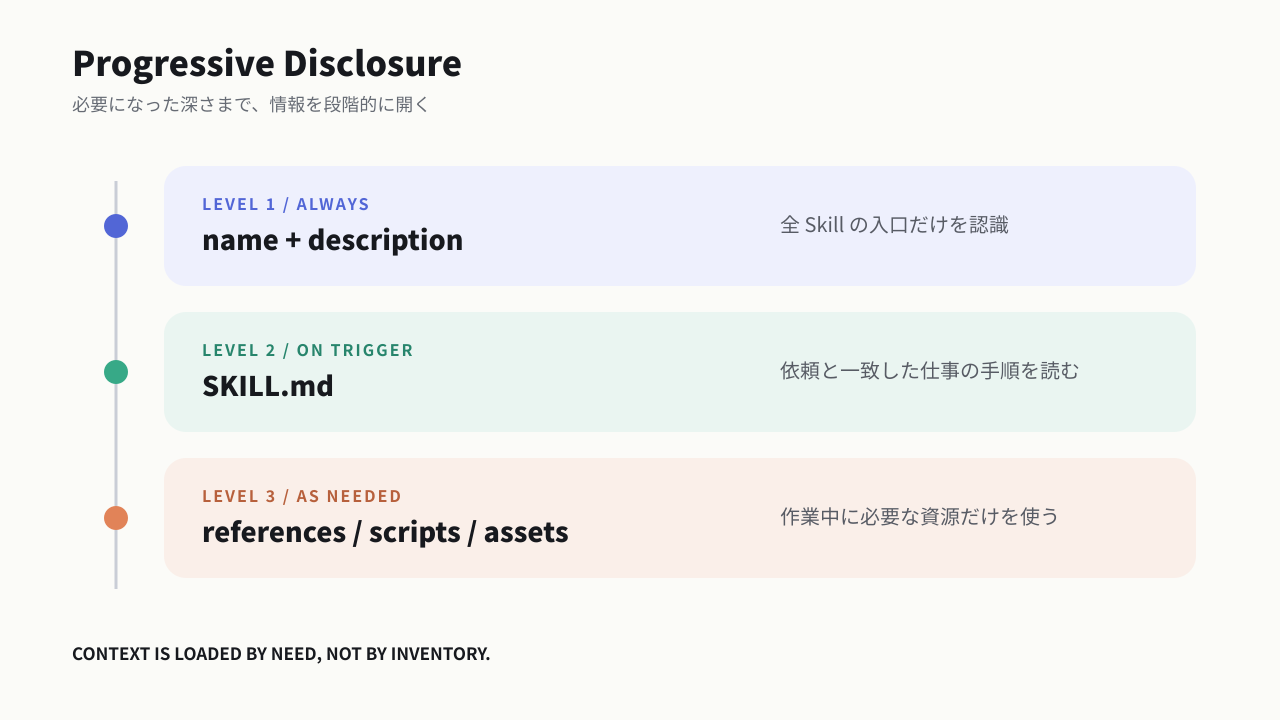
この構造なら、数十個の Skill があっても、毎回すべての説明を会話へ入れる必要がありません。逆に SKILL.md へ会社情報、全 API 仕様、100 個の例、長いテンプレートを詰め込むと、Skill を導入したのにコンテキストを浪費するという逆転が起きます。
最初に重要なのは本文より description です。Claude は本文を読む前に、description を見て「この仕事で使う Skill か」を判断します。Skill の品質は、次の 2 段階に分けて評価しなければなりません。
- 発見の品質 — 必要な依頼で呼ばれ、無関係な依頼では呼ばれないか
- 実行の品質 — 読み込んだあと、正しい順序と基準で仕事を完了できるか
本文を何度直しても Skill が呼ばれない場合、原因は本文ではなく description にあります。反対に、説明を広くしすぎて何にでも発火する Skill は、別の仕事へ強い指示を持ち込みます。公式実装が「使う条件」だけでなく「使わない条件」まで書く理由はここにあります。
Skill と周辺機能の役割も分けておくと、設計が楽になります。
| 仕組み | ひと言で表すと | 適した内容 |
|---|---|---|
CLAUDE.md / AGENTS.md |
常設ルール | リポジトリのコマンド、命名規則、禁止事項 |
| Skill | 再利用する仕事の進め方 | 提案書作成、調査、テスト、ファイル生成 |
| Command | 人が明示的に押す入口 | /review、$research のような呼び出し |
| Subagent | 別の作業担当と別コンテキスト | 調査担当、レビュー担当、読者役 |
| MCP | 外部サービスへ触る道具 | HubSpot、Google Drive、GitHub、社内 API |
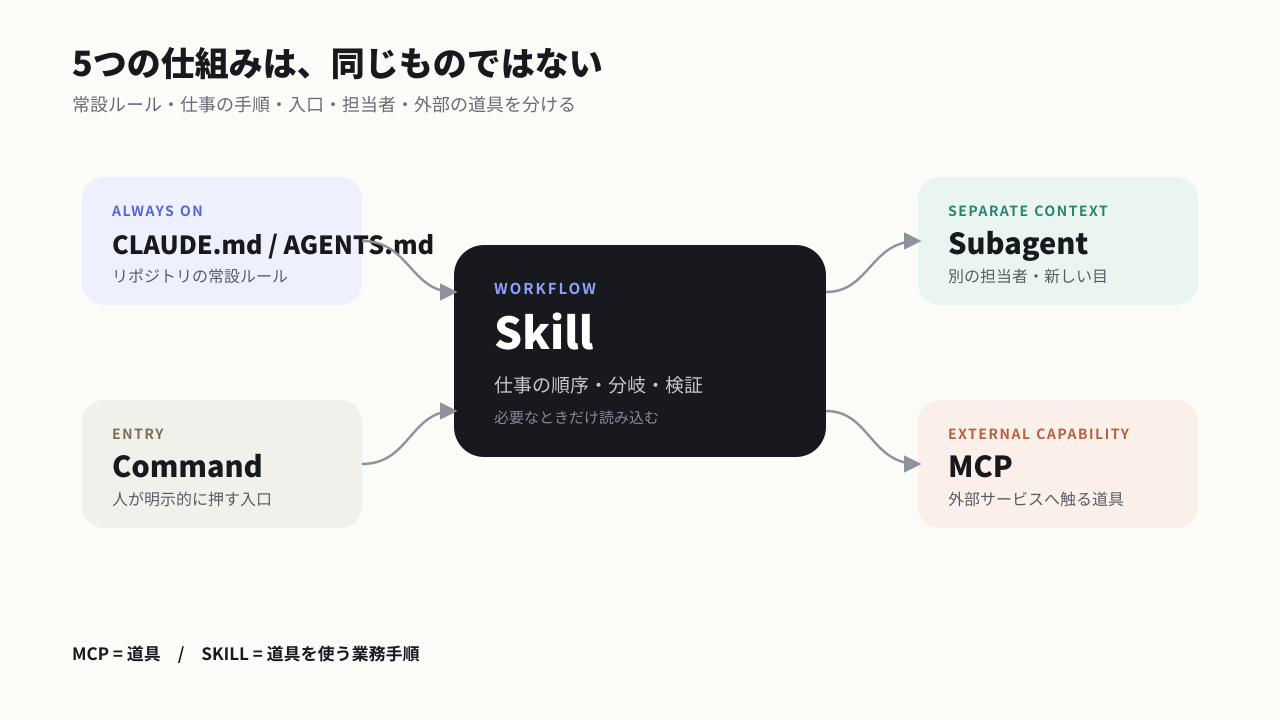
たとえば「毎週、HubSpot の数字を読み、所感を書き、Slack へ投稿する」なら、HubSpot と Slack への接続は MCP、週次レポートの判断順序は Skill、会社共通の KPI 定義は常設ルール、数字の異常検知を独立して行う担当は Subagent です。1 つの巨大 Skill へ全部を混ぜる必要はありません。
よくある失敗は、Skill を知識倉庫にすることです。Claude がすでに知っている一般論ではなく、組織固有のルール、繰り返し失敗した条件、固定したい順序、検証可能な完了条件を入れてください。
→ 自分の業務を Skill 化すべきかどうかは、巻末の 実行キット① で 15 分で判定できます。
2. 公式 17 実装の全体地図 — 3 グループで読む
「Anthropic 公式 Skill は 17 個なのか、Office 系の 4 個なのか。説明によって数が違う」。この混乱は、公開リポジトリと Claude Platform の組み込み機能を同じものとして数えるところから生まれます。
本記事で扱うのは、Anthropic の公式 GitHub リポジトリ anthropics/skills にある 17 実装です。内容が変わると説明もずれるため、2026 年 7 月 11 日に確認した commit 9d2f1ae...4733d を正本に固定しました。
公式 marketplace の分類は 3 グループです。
| 公式グループ | 件数 | Skills |
|---|---|---|
| Example Skills | 12 | algorithmic-art、brand-guidelines、canvas-design、doc-coauthoring、frontend-design、internal-comms、mcp-builder、skill-creator、slack-gif-creator、theme-factory、web-artifacts-builder、webapp-testing |
| Document Skills | 4 | docx、pdf、pptx、xlsx |
| Claude API | 1 | claude-api |
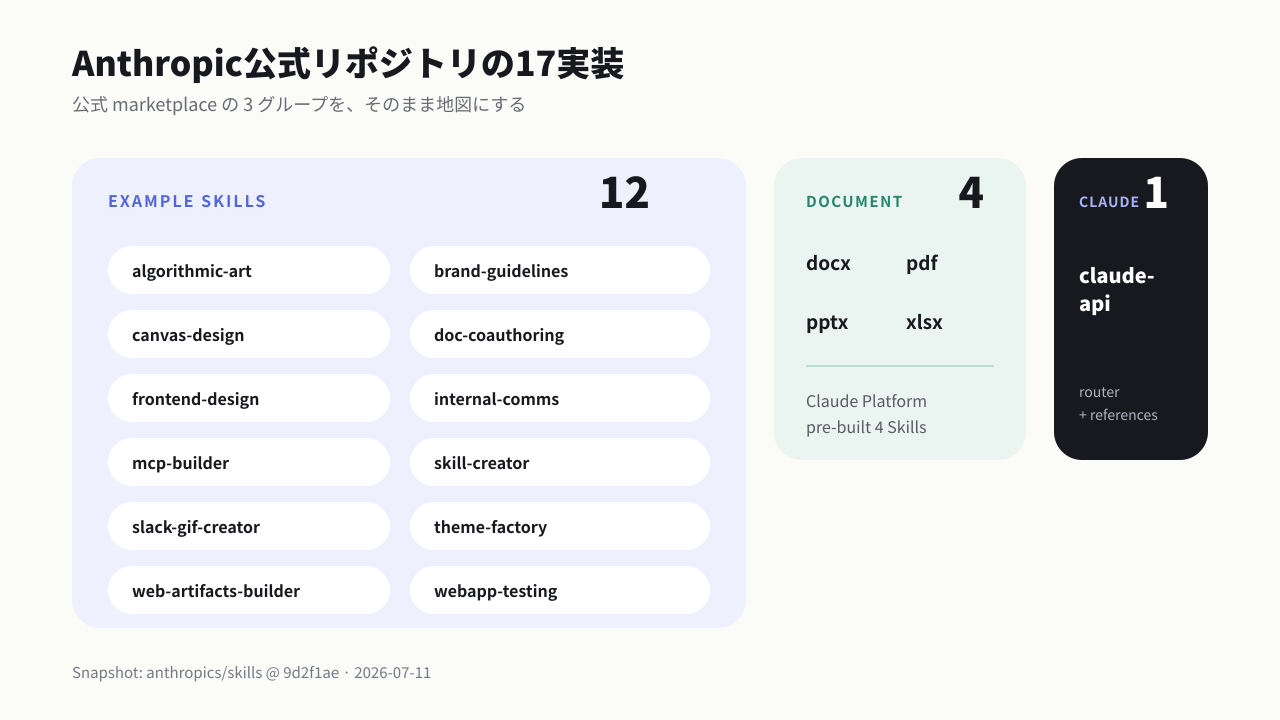
一方、Claude Platform のドキュメントが pre-built Skills として挙げるのは、PowerPoint、Excel、Word、PDF の 4 件です。17 は設計例を含む公式リポジトリの全体、4 は Claude の文書機能で使われる組み込み Skill と理解すると矛盾しません。
17 件を名前順に読むと、用途がばらばらに見えます。学習目的なら、次の 4 つの問いを持って読むと設計の共通性が見えてきます。
- 何を Claude の判断に残しているか
- 何を script や template へ固定しているか
- どこで情報を追加読み込みしているか
- 生成後に何を検査しているか
本記事では、公式分類を保ちながら、理解しやすい順に並べ替えます。まず表現系 6 件、次にワークフロー系 6 件、変化の速い API 1 件、最後に文書生成 4 件です。
各解説の直後には「公式 SKILL.md 原文を読む」という折りたたみを置きます。公開基盤上で全文掲載できる 10 件は英語原文をそのまま収録し、個別ライセンスなどで転載しない 5 件と、公開基盤のセキュリティ制約に触れる 2 件は公式 GitHub へのリンクに留めます。
3. 表現を平均化させない 6 Skills — 創造性と再現性の分離
「AI にデザインを頼むと、違う案件なのに同じ見た目になる」。表現系 Skill が解いているのは、CSS や画像生成の操作方法だけではありません。モデルが安全な平均へ戻る力を、どの工程で止めるかという問題です。
01. algorithmic-art — 実装前に「作品の哲学」を言葉にする
algorithmic-art は p5.js を使い、粒子、ノイズ、ベクトル場、再帰などのルールからジェネラティブアートを作る Skill です。特徴は、いきなりコードを書かないことです。
最初に Algorithmic Philosophy を作り、「何が変化するのか」「秩序とランダムはどう関係するのか」「観客にどんな感覚を残すのか」を言語化します。そのあとで、哲学を粒子数、力、時間変化、色、操作パラメータへ翻訳します。
これは抽象的な要望と実装の間に、中間表現を置く設計です。
- 抽象: 静かな緊張、秩序の崩壊、有機的な流れ
- 中間表現: 動きの規則、密度、反発、反復、色の関係
- 実装: p5.js の関数、変数、描画ループ
さらに randomSeed() と noiseSeed() を使い、同じ seed なら同じ結果を再現できるようにします。ランダムな作品でも、比較、レビュー、再生成ができる状態を作るためです。
画面のサイドバー、seed 操作、保存機能などはテンプレートへ固定し、作品のアルゴリズムだけを可変にします。UX は安定させ、創造性を発揮する場所だけを開く。この分離は、広告クリエイティブや LP 生成の Skill にもそのまま使えます。
公式 SKILL.md 原文を読む(English・全文)
出典: Anthropic公式 algorithmic-art/SKILL.md(commit 9d2f1ae、無改変)
Copyright 2026 Anthropic, PBC. Apache License 2.0 に基づき掲載しています。原文は英語です。
---
name: algorithmic-art
description: Creating algorithmic art using p5.js with seeded randomness and interactive parameter exploration. Use this when users request creating art using code, generative art, algorithmic art, flow fields, or particle systems. Create original algorithmic art rather than copying existing artists' work to avoid copyright violations.
license: Complete terms in LICENSE.txt
---

Algorithmic philosophies are computational aesthetic movements that are then expressed through code. Output .md files (philosophy), .html files (interactive viewer), and .js files (generative algorithms).

This happens in two steps:
1. Algorithmic Philosophy Creation (.md file)
2. Express by creating p5.js generative art (.html + .js files)

First, undertake this task:

## ALGORITHMIC PHILOSOPHY CREATION

To begin, create an ALGORITHMIC PHILOSOPHY (not static images or templates) that will be interpreted through:
- Computational processes, emergent behavior, mathematical beauty
- Seeded randomness, noise fields, organic systems
- Particles, flows, fields, forces
- Parametric variation and controlled chaos

### THE CRITICAL UNDERSTANDING
- What is received: Some subtle input or instructions by the user to take into account, but use as a foundation; it should not constrain creative freedom.
- What is created: An algorithmic philosophy/generative aesthetic movement.
- What happens next: The same version receives the philosophy and EXPRESSES IT IN CODE - creating p5.js sketches that are 90% algorithmic generation, 10% essential parameters.

Consider this approach:
- Write a manifesto for a generative art movement
- The next phase involves writing the algorithm that brings it to life

The philosophy must emphasize: Algorithmic expression. Emergent behavior. Computational beauty. Seeded variation.

### HOW TO GENERATE AN ALGORITHMIC PHILOSOPHY

**Name the movement** (1-2 words): "Organic Turbulence" / "Quantum Harmonics" / "Emergent Stillness"

**Articulate the philosophy** (4-6 paragraphs - concise but complete):

To capture the ALGORITHMIC essence, express how this philosophy manifests through:
- Computational processes and mathematical relationships?
- Noise functions and randomness patterns?
- Particle behaviors and field dynamics?
- Temporal evolution and system states?
- Parametric variation and emergent complexity?

**CRITICAL GUIDELINES:**
- **Avoid redundancy**: Each algorithmic aspect should be mentioned once. Avoid repeating concepts about noise theory, particle dynamics, or mathematical principles unless adding new depth.
- **Emphasize craftsmanship REPEATEDLY**: The philosophy MUST stress multiple times that the final algorithm should appear as though it took countless hours to develop, was refined with care, and comes from someone at the absolute top of their field. This framing is essential - repeat phrases like "meticulously crafted algorithm," "the product of deep computational expertise," "painstaking optimization," "master-level implementation."
- **Leave creative space**: Be specific about the algorithmic direction, but concise enough that the next Claude has room to make interpretive implementation choices at an extremely high level of craftsmanship.

The philosophy must guide the next version to express ideas ALGORITHMICALLY, not through static images. Beauty lives in the process, not the final frame.

### PHILOSOPHY EXAMPLES

**"Organic Turbulence"**
Philosophy: Chaos constrained by natural law, order emerging from disorder.
Algorithmic expression: Flow fields driven by layered Perlin noise. Thousands of particles following vector forces, their trails accumulating into organic density maps. Multiple noise octaves create turbulent regions and calm zones. Color emerges from velocity and density - fast particles burn bright, slow ones fade to shadow. The algorithm runs until equilibrium - a meticulously tuned balance where every parameter was refined through countless iterations by a master of computational aesthetics.

**"Quantum Harmonics"**
Philosophy: Discrete entities exhibiting wave-like interference patterns.
Algorithmic expression: Particles initialized on a grid, each carrying a phase value that evolves through sine waves. When particles are near, their phases interfere - constructive interference creates bright nodes, destructive creates voids. Simple harmonic motion generates complex emergent mandalas. The result of painstaking frequency calibration where every ratio was carefully chosen to produce resonant beauty.

**"Recursive Whispers"**
Philosophy: Self-similarity across scales, infinite depth in finite space.
Algorithmic expression: Branching structures that subdivide recursively. Each branch slightly randomized but constrained by golden ratios. L-systems or recursive subdivision generate tree-like forms that feel both mathematical and organic. Subtle noise perturbations break perfect symmetry. Line weights diminish with each recursion level. Every branching angle the product of deep mathematical exploration.

**"Field Dynamics"**
Philosophy: Invisible forces made visible through their effects on matter.
Algorithmic expression: Vector fields constructed from mathematical functions or noise. Particles born at edges, flowing along field lines, dying when they reach equilibrium or boundaries. Multiple fields can attract, repel, or rotate particles. The visualization shows only the traces - ghost-like evidence of invisible forces. A computational dance meticulously choreographed through force balance.

**"Stochastic Crystallization"**
Philosophy: Random processes crystallizing into ordered structures.
Algorithmic expression: Randomized circle packing or Voronoi tessellation. Start with random points, let them evolve through relaxation algorithms. Cells push apart until equilibrium. Color based on cell size, neighbor count, or distance from center. The organic tiling that emerges feels both random and inevitable. Every seed produces unique crystalline beauty - the mark of a master-level generative algorithm.

*These are condensed examples. The actual algorithmic philosophy should be 4-6 substantial paragraphs.*

### ESSENTIAL PRINCIPLES
- **ALGORITHMIC PHILOSOPHY**: Creating a computational worldview to be expressed through code
- **PROCESS OVER PRODUCT**: Always emphasize that beauty emerges from the algorithm's execution - each run is unique
- **PARAMETRIC EXPRESSION**: Ideas communicate through mathematical relationships, forces, behaviors - not static composition
- **ARTISTIC FREEDOM**: The next Claude interprets the philosophy algorithmically - provide creative implementation room
- **PURE GENERATIVE ART**: This is about making LIVING ALGORITHMS, not static images with randomness
- **EXPERT CRAFTSMANSHIP**: Repeatedly emphasize the final algorithm must feel meticulously crafted, refined through countless iterations, the product of deep expertise by someone at the absolute top of their field in computational aesthetics

**The algorithmic philosophy should be 4-6 paragraphs long.** Fill it with poetic computational philosophy that brings together the intended vision. Avoid repeating the same points. Output this algorithmic philosophy as a .md file.

---

## DEDUCING THE CONCEPTUAL SEED

**CRITICAL STEP**: Before implementing the algorithm, identify the subtle conceptual thread from the original request.

**THE ESSENTIAL PRINCIPLE**:
The concept is a **subtle, niche reference embedded within the algorithm itself** - not always literal, always sophisticated. Someone familiar with the subject should feel it intuitively, while others simply experience a masterful generative composition. The algorithmic philosophy provides the computational language. The deduced concept provides the soul - the quiet conceptual DNA woven invisibly into parameters, behaviors, and emergence patterns.

This is **VERY IMPORTANT**: The reference must be so refined that it enhances the work's depth without announcing itself. Think like a jazz musician quoting another song through algorithmic harmony - only those who know will catch it, but everyone appreciates the generative beauty.

---

## P5.JS IMPLEMENTATION

With the philosophy AND conceptual framework established, express it through code. Pause to gather thoughts before proceeding. Use only the algorithmic philosophy created and the instructions below.

### ⚠️ STEP 0: READ THE TEMPLATE FIRST ⚠️

**CRITICAL: BEFORE writing any HTML:**

1. **Read** `templates/viewer.html` using the Read tool
2. **Study** the exact structure, styling, and Anthropic branding
3. **Use that file as the LITERAL STARTING POINT** - not just inspiration
4. **Keep all FIXED sections exactly as shown** (header, sidebar structure, Anthropic colors/fonts, seed controls, action buttons)
5. **Replace only the VARIABLE sections** marked in the file's comments (algorithm, parameters, UI controls for parameters)

**Avoid:**
- ❌ Creating HTML from scratch
- ❌ Inventing custom styling or color schemes
- ❌ Using system fonts or dark themes
- ❌ Changing the sidebar structure

**Follow these practices:**
- ✅ Copy the template's exact HTML structure
- ✅ Keep Anthropic branding (Poppins/Lora fonts, light colors, gradient backdrop)
- ✅ Maintain the sidebar layout (Seed → Parameters → Colors? → Actions)
- ✅ Replace only the p5.js algorithm and parameter controls

The template is the foundation. Build on it, don't rebuild it.

---

To create gallery-quality computational art that lives and breathes, use the algorithmic philosophy as the foundation.

### TECHNICAL REQUIREMENTS

**Seeded Randomness (Art Blocks Pattern)**:
```javascript
// ALWAYS use a seed for reproducibility
let seed = 12345; // or hash from user input
randomSeed(seed);
noiseSeed(seed);
```

**Parameter Structure - FOLLOW THE PHILOSOPHY**:

To establish parameters that emerge naturally from the algorithmic philosophy, consider: "What qualities of this system can be adjusted?"

```javascript
let params = {
  seed: 12345,  // Always include seed for reproducibility
  // colors
  // Add parameters that control YOUR algorithm:
  // - Quantities (how many?)
  // - Scales (how big? how fast?)
  // - Probabilities (how likely?)
  // - Ratios (what proportions?)
  // - Angles (what direction?)
  // - Thresholds (when does behavior change?)
};
```

**To design effective parameters, focus on the properties the system needs to be tunable rather than thinking in terms of "pattern types".**

**Core Algorithm - EXPRESS THE PHILOSOPHY**:

**CRITICAL**: The algorithmic philosophy should dictate what to build.

To express the philosophy through code, avoid thinking "which pattern should I use?" and instead think "how to express this philosophy through code?"

If the philosophy is about **organic emergence**, consider using:
- Elements that accumulate or grow over time
- Random processes constrained by natural rules
- Feedback loops and interactions

If the philosophy is about **mathematical beauty**, consider using:
- Geometric relationships and ratios
- Trigonometric functions and harmonics
- Precise calculations creating unexpected patterns

If the philosophy is about **controlled chaos**, consider using:
- Random variation within strict boundaries
- Bifurcation and phase transitions
- Order emerging from disorder

**The algorithm flows from the philosophy, not from a menu of options.**

To guide the implementation, let the conceptual essence inform creative and original choices. Build something that expresses the vision for this particular request.

**Canvas Setup**: Standard p5.js structure:
```javascript
function setup() {
  createCanvas(1200, 1200);
  // Initialize your system
}

function draw() {
  // Your generative algorithm
  // Can be static (noLoop) or animated
}
```

### CRAFTSMANSHIP REQUIREMENTS

**CRITICAL**: To achieve mastery, create algorithms that feel like they emerged through countless iterations by a master generative artist. Tune every parameter carefully. Ensure every pattern emerges with purpose. This is NOT random noise - this is CONTROLLED CHAOS refined through deep expertise.

- **Balance**: Complexity without visual noise, order without rigidity
- **Color Harmony**: Thoughtful palettes, not random RGB values
- **Composition**: Even in randomness, maintain visual hierarchy and flow
- **Performance**: Smooth execution, optimized for real-time if animated
- **Reproducibility**: Same seed ALWAYS produces identical output

### OUTPUT FORMAT

Output:
1. **Algorithmic Philosophy** - As markdown or text explaining the generative aesthetic
2. **Single HTML Artifact** - Self-contained interactive generative art built from `templates/viewer.html` (see STEP 0 and next section)

The HTML artifact contains everything: p5.js (from CDN), the algorithm, parameter controls, and UI - all in one file that works immediately in claude.ai artifacts or any browser. Start from the template file, not from scratch.

---

## INTERACTIVE ARTIFACT CREATION

**REMINDER: `templates/viewer.html` should have already been read (see STEP 0). Use that file as the starting point.**

To allow exploration of the generative art, create a single, self-contained HTML artifact. Ensure this artifact works immediately in claude.ai or any browser - no setup required. Embed everything inline.

### CRITICAL: WHAT'S FIXED VS VARIABLE

The `templates/viewer.html` file is the foundation. It contains the exact structure and styling needed.

**FIXED (always include exactly as shown):**
- Layout structure (header, sidebar, main canvas area)
- Anthropic branding (UI colors, fonts, gradients)
- Seed section in sidebar:
  - Seed display
  - Previous/Next buttons
  - Random button
  - Jump to seed input + Go button
- Actions section in sidebar:
  - Regenerate button
  - Reset button

**VARIABLE (customize for each artwork):**
- The entire p5.js algorithm (setup/draw/classes)
- The parameters object (define what the art needs)
- The Parameters section in sidebar:
  - Number of parameter controls
  - Parameter names
  - Min/max/step values for sliders
  - Control types (sliders, inputs, etc.)
- Colors section (optional):
  - Some art needs color pickers
  - Some art might use fixed colors
  - Some art might be monochrome (no color controls needed)
  - Decide based on the art's needs

**Every artwork should have unique parameters and algorithm!** The fixed parts provide consistent UX - everything else expresses the unique vision.

### REQUIRED FEATURES

**1. Parameter Controls**
- Sliders for numeric parameters (particle count, noise scale, speed, etc.)
- Color pickers for palette colors
- Real-time updates when parameters change
- Reset button to restore defaults

**2. Seed Navigation**
- Display current seed number
- "Previous" and "Next" buttons to cycle through seeds
- "Random" button for random seed
- Input field to jump to specific seed
- Generate 100 variations when requested (seeds 1-100)

**3. Single Artifact Structure**
```html
<!DOCTYPE html>
<html>
<head>
  <!-- p5.js from CDN - always available -->
  <script src="https://cdnjs.cloudflare.com/ajax/libs/p5.js/1.7.0/p5.min.js"></script>
  <style>
    /* All styling inline - clean, minimal */
    /* Canvas on top, controls below */
  </style>
</head>
<body>
  <div id="canvas-container"></div>
  <div id="controls">
    <!-- All parameter controls -->
  </div>
  <script>
    // ALL p5.js code inline here
    // Parameter objects, classes, functions
    // setup() and draw()
    // UI handlers
    // Everything self-contained
  </script>
</body>
</html>
```

**CRITICAL**: This is a single artifact. No external files, no imports (except p5.js CDN). Everything inline.

**4. Implementation Details - BUILD THE SIDEBAR**

The sidebar structure:

**1. Seed (FIXED)** - Always include exactly as shown:
- Seed display
- Prev/Next/Random/Jump buttons

**2. Parameters (VARIABLE)** - Create controls for the art:
```html
<div class="control-group">
    <label>Parameter Name</label>
    <input type="range" id="param" min="..." max="..." step="..." value="..." oninput="updateParam('param', this.value)">
    <span class="value-display" id="param-value">...</span>
</div>
```
Add as many control-group divs as there are parameters.

**3. Colors (OPTIONAL/VARIABLE)** - Include if the art needs adjustable colors:
- Add color pickers if users should control palette
- Skip this section if the art uses fixed colors
- Skip if the art is monochrome

**4. Actions (FIXED)** - Always include exactly as shown:
- Regenerate button
- Reset button
- Download PNG button

**Requirements**:
- Seed controls must work (prev/next/random/jump/display)
- All parameters must have UI controls
- Regenerate, Reset, Download buttons must work
- Keep Anthropic branding (UI styling, not art colors)

### USING THE ARTIFACT

The HTML artifact works immediately:
1. **In claude.ai**: Displayed as an interactive artifact - runs instantly
2. **As a file**: Save and open in any browser - no server needed
3. **Sharing**: Send the HTML file - it's completely self-contained

---

## VARIATIONS & EXPLORATION

The artifact includes seed navigation by default (prev/next/random buttons), allowing users to explore variations without creating multiple files. If the user wants specific variations highlighted:

- Include seed presets (buttons for "Variation 1: Seed 42", "Variation 2: Seed 127", etc.)
- Add a "Gallery Mode" that shows thumbnails of multiple seeds side-by-side
- All within the same single artifact

This is like creating a series of prints from the same plate - the algorithm is consistent, but each seed reveals different facets of its potential. The interactive nature means users discover their own favorites by exploring the seed space.

---

## THE CREATIVE PROCESS

**User request** → **Algorithmic philosophy** → **Implementation**

Each request is unique. The process involves:

1. **Interpret the user's intent** - What aesthetic is being sought?
2. **Create an algorithmic philosophy** (4-6 paragraphs) describing the computational approach
3. **Implement it in code** - Build the algorithm that expresses this philosophy
4. **Design appropriate parameters** - What should be tunable?
5. **Build matching UI controls** - Sliders/inputs for those parameters

**The constants**:
- Anthropic branding (colors, fonts, layout)
- Seed navigation (always present)
- Self-contained HTML artifact

**Everything else is variable**:
- The algorithm itself
- The parameters
- The UI controls
- The visual outcome

To achieve the best results, trust creativity and let the philosophy guide the implementation.

---

## RESOURCES

This skill includes helpful templates and documentation:

- **templates/viewer.html**: REQUIRED STARTING POINT for all HTML artifacts.
  - This is the foundation - contains the exact structure and Anthropic branding
  - **Keep unchanged**: Layout structure, sidebar organization, Anthropic colors/fonts, seed controls, action buttons
  - **Replace**: The p5.js algorithm, parameter definitions, and UI controls in Parameters section
  - The extensive comments in the file mark exactly what to keep vs replace

- **templates/generator_template.js**: Reference for p5.js best practices and code structure principles.
  - Shows how to organize parameters, use seeded randomness, structure classes
  - NOT a pattern menu - use these principles to build unique algorithms
  - Embed algorithms inline in the HTML artifact (don't create separate .js files)

**Critical reminder**:
- The **template is the STARTING POINT**, not inspiration
- The **algorithm is where to create** something unique
- Don't copy the flow field example - build what the philosophy demands
- But DO keep the exact UI structure and Anthropic branding from the template
02. brand-guidelines — 一般論ではなく、組織固有の差分だけを渡す
brand-guidelines は、Anthropic の色とフォントを成果物へ適用する Skill です。17 件のなかでは驚くほど短く、主にカラーコード、見出し書体、本文書体、適用時の簡単な原則だけが書かれています。
短いのは情報不足ではありません。Claude は、コントラスト、見出し階層、余白、読みやすさといった一般的なデザイン知識をすでに持っています。Skill で追加すべきなのは、Anthropic では見出しに何を使い、どの色を主役にし、どの組み合わせを避けるかという固有差分です。
悪いブランド Skill は「読みやすいフォントを使う」「色を調和させる」と書きます。良いブランド Skill は、色コード、font family、ロゴの最小余白、写真の傾向、禁止表現を具体値で渡します。
自社用に応用するなら、1 つの巨大な marketing Skill にブランド情報を重複させず、ブランド Skill を独立させます。提案書、LP、広告、SNS 投稿のどれからでも同じルールを参照でき、更新箇所も 1 つになります。
公式 SKILL.md 原文を読む(English・全文)
出典: Anthropic公式 brand-guidelines/SKILL.md(commit 9d2f1ae、無改変)
Copyright 2026 Anthropic, PBC. Apache License 2.0 に基づき掲載しています。原文は英語です。
---
name: brand-guidelines
description: Applies Anthropic's official brand colors and typography to any sort of artifact that may benefit from having Anthropic's look-and-feel. Use it when brand colors or style guidelines, visual formatting, or company design standards apply.
license: Complete terms in LICENSE.txt
---

# Anthropic Brand Styling

## Overview

To access Anthropic's official brand identity and style resources, use this skill.

**Keywords**: branding, corporate identity, visual identity, post-processing, styling, brand colors, typography, Anthropic brand, visual formatting, visual design

## Brand Guidelines

### Colors

**Main Colors:**

- Dark: `#141413` - Primary text and dark backgrounds
- Light: `#faf9f5` - Light backgrounds and text on dark
- Mid Gray: `#b0aea5` - Secondary elements
- Light Gray: `#e8e6dc` - Subtle backgrounds

**Accent Colors:**

- Orange: `#d97757` - Primary accent
- Blue: `#6a9bcc` - Secondary accent
- Green: `#788c5d` - Tertiary accent

### Typography

- **Headings**: Poppins (with Arial fallback)
- **Body Text**: Lora (with Georgia fallback)
- **Note**: Fonts should be pre-installed in your environment for best results

## Features

### Smart Font Application

- Applies Poppins font to headings (24pt and larger)
- Applies Lora font to body text
- Automatically falls back to Arial/Georgia if custom fonts unavailable
- Preserves readability across all systems

### Text Styling

- Headings (24pt+): Poppins font
- Body text: Lora font
- Smart color selection based on background
- Preserves text hierarchy and formatting

### Shape and Accent Colors

- Non-text shapes use accent colors
- Cycles through orange, blue, and green accents
- Maintains visual interest while staying on-brand

## Technical Details

### Font Management

- Uses system-installed Poppins and Lora fonts when available
- Provides automatic fallback to Arial (headings) and Georgia (body)
- No font installation required - works with existing system fonts
- For best results, pre-install Poppins and Lora fonts in your environment

### Color Application

- Uses RGB color values for precise brand matching
- Applied via python-pptx's RGBColor class
- Maintains color fidelity across different systems
03. canvas-design — テキストで説明せず、構図で伝える
canvas-design はポスター、静的アート、PNG、PDF など、1 枚の画面で完結するデザインを作ります。algorithmic-art との違いは、アルゴリズムそのものではなく、最終的な静止画の構図が作品になる点です。
ここでも、制作前に Visual Philosophy を言葉にします。ただし、その哲学は最終成果物へ文章として載せる説明ではありません。余白、形、比率、色、視線の順序、タイポグラフィへ変換するための内部設計です。
Skill は、視覚 90%、テキスト 10% という考え方を強く押し出します。LLM は不明点を文章で補いたがるため、「説明文を増やさない」「文字を情報だけでなく形として扱う」と制約する必要があるからです。
もう 1 つ重要なのが、改善時に要素を足すのではなく、既存の構成を磨く方針です。生成 AI へ「もっと良くして」と頼むと、グラデーション、線、アイコン、カードを追加しがちです。公式 Skill は、揃える、減らす、間隔を調整する、色数を絞るという方向へ戻します。
公式 SKILL.md 原文を読む(English・全文)
出典: Anthropic公式 canvas-design/SKILL.md(commit 9d2f1ae、無改変)
Copyright 2026 Anthropic, PBC. Apache License 2.0 に基づき掲載しています。原文は英語です。
---
name: canvas-design
description: Create beautiful visual art in .png and .pdf documents using design philosophy. You should use this skill when the user asks to create a poster, piece of art, design, or other static piece. Create original visual designs, never copying existing artists' work to avoid copyright violations.
license: Complete terms in LICENSE.txt
---

These are instructions for creating design philosophies - aesthetic movements that are then EXPRESSED VISUALLY. Output only .md files, .pdf files, and .png files.

Complete this in two steps:
1. Design Philosophy Creation (.md file)
2. Express by creating it on a canvas (.pdf file or .png file)

First, undertake this task:

## DESIGN PHILOSOPHY CREATION

To begin, create a VISUAL PHILOSOPHY (not layouts or templates) that will be interpreted through:
- Form, space, color, composition
- Images, graphics, shapes, patterns
- Minimal text as visual accent

### THE CRITICAL UNDERSTANDING
- What is received: Some subtle input or instructions by the user that should be taken into account, but used as a foundation; it should not constrain creative freedom.
- What is created: A design philosophy/aesthetic movement.
- What happens next: Then, the same version receives the philosophy and EXPRESSES IT VISUALLY - creating artifacts that are 90% visual design, 10% essential text.

Consider this approach:
- Write a manifesto for an art movement
- The next phase involves making the artwork

The philosophy must emphasize: Visual expression. Spatial communication. Artistic interpretation. Minimal words.

### HOW TO GENERATE A VISUAL PHILOSOPHY

**Name the movement** (1-2 words): "Brutalist Joy" / "Chromatic Silence" / "Metabolist Dreams"

**Articulate the philosophy** (4-6 paragraphs - concise but complete):

To capture the VISUAL essence, express how the philosophy manifests through:
- Space and form
- Color and material
- Scale and rhythm
- Composition and balance
- Visual hierarchy

**CRITICAL GUIDELINES:**
- **Avoid redundancy**: Each design aspect should be mentioned once. Avoid repeating points about color theory, spatial relationships, or typographic principles unless adding new depth.
- **Emphasize craftsmanship REPEATEDLY**: The philosophy MUST stress multiple times that the final work should appear as though it took countless hours to create, was labored over with care, and comes from someone at the absolute top of their field. This framing is essential - repeat phrases like "meticulously crafted," "the product of deep expertise," "painstaking attention," "master-level execution."
- **Leave creative space**: Remain specific about the aesthetic direction, but concise enough that the next Claude has room to make interpretive choices also at a extremely high level of craftmanship.

The philosophy must guide the next version to express ideas VISUALLY, not through text. Information lives in design, not paragraphs.

### PHILOSOPHY EXAMPLES

**"Concrete Poetry"**
Philosophy: Communication through monumental form and bold geometry.
Visual expression: Massive color blocks, sculptural typography (huge single words, tiny labels), Brutalist spatial divisions, Polish poster energy meets Le Corbusier. Ideas expressed through visual weight and spatial tension, not explanation. Text as rare, powerful gesture - never paragraphs, only essential words integrated into the visual architecture. Every element placed with the precision of a master craftsman.

**"Chromatic Language"**
Philosophy: Color as the primary information system.
Visual expression: Geometric precision where color zones create meaning. Typography minimal - small sans-serif labels letting chromatic fields communicate. Think Josef Albers' interaction meets data visualization. Information encoded spatially and chromatically. Words only to anchor what color already shows. The result of painstaking chromatic calibration.

**"Analog Meditation"**
Philosophy: Quiet visual contemplation through texture and breathing room.
Visual expression: Paper grain, ink bleeds, vast negative space. Photography and illustration dominate. Typography whispered (small, restrained, serving the visual). Japanese photobook aesthetic. Images breathe across pages. Text appears sparingly - short phrases, never explanatory blocks. Each composition balanced with the care of a meditation practice.

**"Organic Systems"**
Philosophy: Natural clustering and modular growth patterns.
Visual expression: Rounded forms, organic arrangements, color from nature through architecture. Information shown through visual diagrams, spatial relationships, iconography. Text only for key labels floating in space. The composition tells the story through expert spatial orchestration.

**"Geometric Silence"**
Philosophy: Pure order and restraint.
Visual expression: Grid-based precision, bold photography or stark graphics, dramatic negative space. Typography precise but minimal - small essential text, large quiet zones. Swiss formalism meets Brutalist material honesty. Structure communicates, not words. Every alignment the work of countless refinements.

*These are condensed examples. The actual design philosophy should be 4-6 substantial paragraphs.*

### ESSENTIAL PRINCIPLES
- **VISUAL PHILOSOPHY**: Create an aesthetic worldview to be expressed through design
- **MINIMAL TEXT**: Always emphasize that text is sparse, essential-only, integrated as visual element - never lengthy
- **SPATIAL EXPRESSION**: Ideas communicate through space, form, color, composition - not paragraphs
- **ARTISTIC FREEDOM**: The next Claude interprets the philosophy visually - provide creative room
- **PURE DESIGN**: This is about making ART OBJECTS, not documents with decoration
- **EXPERT CRAFTSMANSHIP**: Repeatedly emphasize the final work must look meticulously crafted, labored over with care, the product of countless hours by someone at the top of their field

**The design philosophy should be 4-6 paragraphs long.** Fill it with poetic design philosophy that brings together the core vision. Avoid repeating the same points. Keep the design philosophy generic without mentioning the intention of the art, as if it can be used wherever. Output the design philosophy as a .md file.

---

## DEDUCING THE SUBTLE REFERENCE

**CRITICAL STEP**: Before creating the canvas, identify the subtle conceptual thread from the original request.

**THE ESSENTIAL PRINCIPLE**:
The topic is a **subtle, niche reference embedded within the art itself** - not always literal, always sophisticated. Someone familiar with the subject should feel it intuitively, while others simply experience a masterful abstract composition. The design philosophy provides the aesthetic language. The deduced topic provides the soul - the quiet conceptual DNA woven invisibly into form, color, and composition.

This is **VERY IMPORTANT**: The reference must be refined so it enhances the work's depth without announcing itself. Think like a jazz musician quoting another song - only those who know will catch it, but everyone appreciates the music.

---

## CANVAS CREATION

With both the philosophy and the conceptual framework established, express it on a canvas. Take a moment to gather thoughts and clear the mind. Use the design philosophy created and the instructions below to craft a masterpiece, embodying all aspects of the philosophy with expert craftsmanship.

**IMPORTANT**: For any type of content, even if the user requests something for a movie/game/book, the approach should still be sophisticated. Never lose sight of the idea that this should be art, not something that's cartoony or amateur.

To create museum or magazine quality work, use the design philosophy as the foundation. Create one single page, highly visual, design-forward PDF or PNG output (unless asked for more pages). Generally use repeating patterns and perfect shapes. Treat the abstract philosophical design as if it were a scientific bible, borrowing the visual language of systematic observation—dense accumulation of marks, repeated elements, or layered patterns that build meaning through patient repetition and reward sustained viewing. Add sparse, clinical typography and systematic reference markers that suggest this could be a diagram from an imaginary discipline, treating the invisible subject with the same reverence typically reserved for documenting observable phenomena. Anchor the piece with simple phrase(s) or details positioned subtly, using a limited color palette that feels intentional and cohesive. Embrace the paradox of using analytical visual language to express ideas about human experience: the result should feel like an artifact that proves something ephemeral can be studied, mapped, and understood through careful attention. This is true art.

**Text as a contextual element**: Text is always minimal and visual-first, but let context guide whether that means whisper-quiet labels or bold typographic gestures. A punk venue poster might have larger, more aggressive type than a minimalist ceramics studio identity. Most of the time, font should be thin. All use of fonts must be design-forward and prioritize visual communication. Regardless of text scale, nothing falls off the page and nothing overlaps. Every element must be contained within the canvas boundaries with proper margins. Check carefully that all text, graphics, and visual elements have breathing room and clear separation. This is non-negotiable for professional execution. **IMPORTANT: Use different fonts if writing text. Search the `./canvas-fonts` directory. Regardless of approach, sophistication is non-negotiable.**

Download and use whatever fonts are needed to make this a reality. Get creative by making the typography actually part of the art itself -- if the art is abstract, bring the font onto the canvas, not typeset digitally.

To push boundaries, follow design instinct/intuition while using the philosophy as a guiding principle. Embrace ultimate design freedom and choice. Push aesthetics and design to the frontier.

**CRITICAL**: To achieve human-crafted quality (not AI-generated), create work that looks like it took countless hours. Make it appear as though someone at the absolute top of their field labored over every detail with painstaking care. Ensure the composition, spacing, color choices, typography - everything screams expert-level craftsmanship. Double-check that nothing overlaps, formatting is flawless, every detail perfect. Create something that could be shown to people to prove expertise and rank as undeniably impressive.

Output the final result as a single, downloadable .pdf or .png file, alongside the design philosophy used as a .md file.

---

## FINAL STEP

**IMPORTANT**: The user ALREADY said "It isn't perfect enough. It must be pristine, a masterpiece if craftsmanship, as if it were about to be displayed in a museum."

**CRITICAL**: To refine the work, avoid adding more graphics; instead refine what has been created and make it extremely crisp, respecting the design philosophy and the principles of minimalism entirely. Rather than adding a fun filter or refactoring a font, consider how to make the existing composition more cohesive with the art. If the instinct is to call a new function or draw a new shape, STOP and instead ask: "How can I make what's already here more of a piece of art?"

Take a second pass. Go back to the code and refine/polish further to make this a philosophically designed masterpiece.

## MULTI-PAGE OPTION

To create additional pages when requested, create more creative pages along the same lines as the design philosophy but distinctly different as well. Bundle those pages in the same .pdf or many .pngs. Treat the first page as just a single page in a whole coffee table book waiting to be filled. Make the next pages unique twists and memories of the original. Have them almost tell a story in a very tasteful way. Exercise full creative freedom.
04. frontend-design — コードの前に、意図のある見た目を決める
frontend-design は、本番で使える Web UI を、案件固有の視覚表現で作る Skill です。解決したいのは「Inter、紫のグラデーション、白い丸角カード、中央揃えの Hero」という生成 AI の平均的な見た目です。
公式実装は、特定のデザイン様式を正解にしません。先に brief の目的と利用者を読み、視覚的な方向性を選び、色、書体、レイアウト、動き、ひと目でその画面と分かる signature element を決めます。そこから自分で批評し、実装し、もう一度批評します。
大切なのは「大胆にする」という形容ではなく、選択に理由を持たせることです。金融管理画面と音楽イベントのページが同じ layout token を持つなら、要件からデザインを導けていません。
自社 Skill へ移すときは、「紫を禁止」「カードを禁止」のような表層ルールだけをコピーしないでください。案件理解 → design direction → token → signature → critique という判断順序を移すことが本質です。
公式 SKILL.md 原文を読む(English・全文)
出典: Anthropic公式 frontend-design/SKILL.md(commit 9d2f1ae、無改変)
Copyright 2026 Anthropic, PBC. Apache License 2.0 に基づき掲載しています。原文は英語です。
---
name: frontend-design
description: Guidance for distinctive, intentional visual design when building new UI or reshaping an existing one. Helps with aesthetic direction, typography, and making choices that don't read as templated defaults.
license: Complete terms in LICENSE.txt
---

# Frontend Design

Approach this as the design lead at a small studio known for giving every client a visual identity that could not be mistaken for anyone else's. This client has already rejected proposals that felt templated, and is paying for a distinctive point of view: make deliberate, opinionated choices about palette, typography, and layout that are specific to this brief, and take one real aesthetic risk you can justify.

## Ground it in the subject

If the brief does not pin down what the product or subject is, pin it yourself before designing: name one concrete subject, its audience, and the page's single job, and state your choice. If there's any information in your memory about the human's preferences, context about what they're building, or designs you've made before – use that as a hint. The subject's own world, its materials, instruments, artifacts, and vernacular, is where distinctive choices come from. Build with the brief's real content and subject matter throughout.

## Design principles

For web designs, the hero is a thesis. Open with the most characteristic thing in the subject's world, in whatever form makes sense for it: a headline, an image, an animation, a live demo, an interactive moment. Be deliberate with your choice: a big number with a small label, supporting stats, and a gradient accent is the template answer, only use if that's truly the best option.

Typography carries the personality of the page. Pair the display and body faces deliberately, not the same families you would reach for on any other project, and set a clear type scale with intentional weights, widths, and spacing. Make the type treatment itself a memorable part of the design, not a neutral delivery vehicle for the content.

Structure is information. Structural devices, numbering, eyebrows, dividers, labels, should encode something true about the content, not decorate it. Many generic designs use numbered markers (01 / 02 / 03), but that's only appropriate if the content actually is a sequence - like a real process or a typed timeline where order carries information the reader needs. Question if choices like numbered markers actually make sense before incorporating them.

Leverage motion deliberately. Think about where and if animation can serve the subject: a page-load sequence, a scroll-triggered reveal, hover micro-interactions, ambient atmosphere. An orchestrated moment usually lands harder than scattered effects; choose what the direction calls for. However, sometimes less is more, and extra animation contributes to the feeling that the design is AI-generated.

Match complexity to the vision. Maximalist directions need elaborate execution; minimal directions need precision in spacing, type, and detail. Elegance is executing the chosen vision well.

Consider written content carefully. Often a design brief may not contain real content, and it's up to you to come up with copy. Copy can make a design feel as templated as the design itself. See the below section on writing for more guidance.

## Process: brainstorm, explore, plan, critique, build, critique again

For calibration: AI-generated design right now clusters around three looks: (1) a warm cream background (near #F4F1EA) with a high-contrast serif display and a terracotta accent; (2) a near-black background with a single bright acid-green or vermilion accent; (3) a broadsheet-style layout with hairline rules, zero border-radius, and dense newspaper-like columns. All three are legitimate for some briefs, but they are defaults rather than choices, and they appear regardless of subject. Where the brief pins down a visual direction, follow it exactly — the brief's own words always win, including when it asks for one of these looks. Where it leaves an axis free, don't spend that freedom on one of these defaults. Just like a human designer who's hired, there's often a careful balance between doing what you're good at and taking each project as a chance to experiment and learn.

Work in two passes. First, brainstorm a short design plan based on the human's design brief: create a compact token system with color, type, layout, and signature. Color: describe the palette as 4–6 named hex values. Type: the typefaces for 2+ roles (a characterful display face that's used with restraint, a complementary body face, and a utility face for captions or data if needed). Layout: a layout concept, using one-sentence prose descriptions and ASCII wireframes to ideate and compare. Signature: the single unique element this page will be remembered by that embodies the brief in an appropriate way.

Then review that plan against the brief before building: if any part of it reads like the generic default you would produce for any similar page (work through a similar prompt to see if you arrive somewhere similar) rather than a choice made for this specific brief — revise that part, say what you changed and why. Only after you've confirmed the relative uniqueness of your design plan should you start to write the code, following the revised plan exactly and deriving every color and type decision from it.

When writing the code, be careful of structuring your CSS selector specificities. It's easy to generate CSS classes that cancel each other out (especially with a type-based selector like .section and a element-based selector like .cta). This can happen often with paddings/margins between sections.

Try to do a lot of this planning and iteration in your thinking, and only show ideas to the user when you have higher confidence it'll delight them.

## Restraint and self-critique

Spend your boldness in one place. Let the signature element be the one memorable thing, keep everything around it quiet and disciplined, and cut any decoration that does not serve the brief. Not taking a risk can be a risk itself! Build to a quality floor without announcing it: responsive down to mobile, visible keyboard focus, reduced motion respected. Critique your own work as you build, taking screenshots if your environment supports it – a picture is worth 1000 tokens. Consider Chanel's advice: before leaving the house, take a look in the mirror and remove one accessory. Human creators have memory and always try to do something new, so if you have a space to quickly jot down notes about what you've tried, it can help you in future passes.

## More on writing in design

Words appear in a design for one reason: to make it easier to understand, and therefore easier to use. They are design material, not decoration. Bring the same intentionality to copy that you would bring to spacing and color. Before writing anything, ask what the design needs to say, and how it can best be said to help the person navigate the experience.

Write from the end user's side of the screen. Name things by what people control and recognize, never by how the system is built. A person manages notifications, not webhook config. Describe what something does in plain terms rather than selling it. Being specific is always better than being clever.

Use active voice as default. A control should say exactly what happens when it's used: "Save changes," not "Submit." An action keeps the same name through the whole flow, so the button that says "Publish" produces a toast that says "Published." The vocabulary of an interface is the signposting for someone navigating the product. Cohesion and consistency are how people learn their way around.

Treat failure and emptiness as moments for direction, not mood. Explain what went wrong and how to fix it, in the interface's voice rather than a person's. Errors don't apologize, and they are never vague about what happened. An empty screen is an invitation to act.

Keep the register conversational and tuned: plain verbs, sentence case, no filler, with tone matched to the brand and the audience. Let each element do exactly one job. A label labels, an example demonstrates, and nothing quietly does double duty.
05. slack-gif-creator — 表現は自由、技術的な面倒は utility へ寄せる
slack-gif-creator は、Slack で使える短い GIF を作る Skill です。128×128 の絵文字、メッセージ内で見る大きさ、フレームレート、色数、ファイル容量など、Slack で破綻しない制約を持っています。
この Skill は完成済みの「喜ぶ」「拍手する」「ロゴが跳ねる」といったアニメーションテンプレートを大量に用意しません。表現まで固定すると、どの依頼も同じ動きになるためです。
代わりに、frame composer、easing、GIF builder、validator など、毎回同じ品質が必要な処理を utility にします。Claude は PIL の基本図形を組み合わせて表現を考え、保存、最適化、検証はコードに任せます。
これは Skill 設計の分かりやすい境界です。発想に関わる部分は AI に残し、ファイル仕様や検証のような決定論的処理は script に固定する。動画、バナー、資料生成でも同じ判断が使えます。
公式 SKILL.md 原文を読む(English・全文)
出典: Anthropic公式 slack-gif-creator/SKILL.md(commit 9d2f1ae、無改変)
Copyright 2026 Anthropic, PBC. Apache License 2.0 に基づき掲載しています。原文は英語です。
---
name: slack-gif-creator
description: Knowledge and utilities for creating animated GIFs optimized for Slack. Provides constraints, validation tools, and animation concepts. Use when users request animated GIFs for Slack like "make me a GIF of X doing Y for Slack."
license: Complete terms in LICENSE.txt
---

# Slack GIF Creator

A toolkit providing utilities and knowledge for creating animated GIFs optimized for Slack.

## Slack Requirements

**Dimensions:**
- Emoji GIFs: 128x128 (recommended)
- Message GIFs: 480x480

**Parameters:**
- FPS: 10-30 (lower is smaller file size)
- Colors: 48-128 (fewer = smaller file size)
- Duration: Keep under 3 seconds for emoji GIFs

## Core Workflow

```python
from core.gif_builder import GIFBuilder
from PIL import Image, ImageDraw

# 1. Create builder
builder = GIFBuilder(width=128, height=128, fps=10)

# 2. Generate frames
for i in range(12):
    frame = Image.new('RGB', (128, 128), (240, 248, 255))
    draw = ImageDraw.Draw(frame)

    # Draw your animation using PIL primitives
    # (circles, polygons, lines, etc.)

    builder.add_frame(frame)

# 3. Save with optimization
builder.save('output.gif', num_colors=48, optimize_for_emoji=True)
```

## Drawing Graphics

### Working with User-Uploaded Images
If a user uploads an image, consider whether they want to:
- **Use it directly** (e.g., "animate this", "split this into frames")
- **Use it as inspiration** (e.g., "make something like this")

Load and work with images using PIL:
```python
from PIL import Image

uploaded = Image.open('file.png')
# Use directly, or just as reference for colors/style
```

### Drawing from Scratch
When drawing graphics from scratch, use PIL ImageDraw primitives:

```python
from PIL import ImageDraw

draw = ImageDraw.Draw(frame)

# Circles/ovals
draw.ellipse([x1, y1, x2, y2], fill=(r, g, b), outline=(r, g, b), width=3)

# Stars, triangles, any polygon
points = [(x1, y1), (x2, y2), (x3, y3), ...]
draw.polygon(points, fill=(r, g, b), outline=(r, g, b), width=3)

# Lines
draw.line([(x1, y1), (x2, y2)], fill=(r, g, b), width=5)

# Rectangles
draw.rectangle([x1, y1, x2, y2], fill=(r, g, b), outline=(r, g, b), width=3)
```

**Don't use:** Emoji fonts (unreliable across platforms) or assume pre-packaged graphics exist in this skill.

### Making Graphics Look Good

Graphics should look polished and creative, not basic. Here's how:

**Use thicker lines** - Always set `width=2` or higher for outlines and lines. Thin lines (width=1) look choppy and amateurish.

**Add visual depth**:
- Use gradients for backgrounds (`create_gradient_background`)
- Layer multiple shapes for complexity (e.g., a star with a smaller star inside)

**Make shapes more interesting**:
- Don't just draw a plain circle - add highlights, rings, or patterns
- Stars can have glows (draw larger, semi-transparent versions behind)
- Combine multiple shapes (stars + sparkles, circles + rings)

**Pay attention to colors**:
- Use vibrant, complementary colors
- Add contrast (dark outlines on light shapes, light outlines on dark shapes)
- Consider the overall composition

**For complex shapes** (hearts, snowflakes, etc.):
- Use combinations of polygons and ellipses
- Calculate points carefully for symmetry
- Add details (a heart can have a highlight curve, snowflakes have intricate branches)

Be creative and detailed! A good Slack GIF should look polished, not like placeholder graphics.

## Available Utilities

### GIFBuilder (`core.gif_builder`)
Assembles frames and optimizes for Slack:
```python
builder = GIFBuilder(width=128, height=128, fps=10)
builder.add_frame(frame)  # Add PIL Image
builder.add_frames(frames)  # Add list of frames
builder.save('out.gif', num_colors=48, optimize_for_emoji=True, remove_duplicates=True)
```

### Validators (`core.validators`)
Check if GIF meets Slack requirements:
```python
from core.validators import validate_gif, is_slack_ready

# Detailed validation
passes, info = validate_gif('my.gif', is_emoji=True, verbose=True)

# Quick check
if is_slack_ready('my.gif'):
    print("Ready!")
```

### Easing Functions (`core.easing`)
Smooth motion instead of linear:
```python
from core.easing import interpolate

# Progress from 0.0 to 1.0
t = i / (num_frames - 1)

# Apply easing
y = interpolate(start=0, end=400, t=t, easing='ease_out')

# Available: linear, ease_in, ease_out, ease_in_out,
#           bounce_out, elastic_out, back_out
```

### Frame Helpers (`core.frame_composer`)
Convenience functions for common needs:
```python
from core.frame_composer import (
    create_blank_frame,         # Solid color background
    create_gradient_background,  # Vertical gradient
    draw_circle,                # Helper for circles
    draw_text,                  # Simple text rendering
    draw_star                   # 5-pointed star
)
```

## Animation Concepts

### Shake/Vibrate
Offset object position with oscillation:
- Use `math.sin()` or `math.cos()` with frame index
- Add small random variations for natural feel
- Apply to x and/or y position

### Pulse/Heartbeat
Scale object size rhythmically:
- Use `math.sin(t * frequency * 2 * math.pi)` for smooth pulse
- For heartbeat: two quick pulses then pause (adjust sine wave)
- Scale between 0.8 and 1.2 of base size

### Bounce
Object falls and bounces:
- Use `interpolate()` with `easing='bounce_out'` for landing
- Use `easing='ease_in'` for falling (accelerating)
- Apply gravity by increasing y velocity each frame

### Spin/Rotate
Rotate object around center:
- PIL: `image.rotate(angle, resample=Image.BICUBIC)`
- For wobble: use sine wave for angle instead of linear

### Fade In/Out
Gradually appear or disappear:
- Create RGBA image, adjust alpha channel
- Or use `Image.blend(image1, image2, alpha)`
- Fade in: alpha from 0 to 1
- Fade out: alpha from 1 to 0

### Slide
Move object from off-screen to position:
- Start position: outside frame bounds
- End position: target location
- Use `interpolate()` with `easing='ease_out'` for smooth stop
- For overshoot: use `easing='back_out'`

### Zoom
Scale and position for zoom effect:
- Zoom in: scale from 0.1 to 2.0, crop center
- Zoom out: scale from 2.0 to 1.0
- Can add motion blur for drama (PIL filter)

### Explode/Particle Burst
Create particles radiating outward:
- Generate particles with random angles and velocities
- Update each particle: `x += vx`, `y += vy`
- Add gravity: `vy += gravity_constant`
- Fade out particles over time (reduce alpha)

## Optimization Strategies

Only when asked to make the file size smaller, implement a few of the following methods:

1. **Fewer frames** - Lower FPS (10 instead of 20) or shorter duration
2. **Fewer colors** - `num_colors=48` instead of 128
3. **Smaller dimensions** - 128x128 instead of 480x480
4. **Remove duplicates** - `remove_duplicates=True` in save()
5. **Emoji mode** - `optimize_for_emoji=True` auto-optimizes

```python
# Maximum optimization for emoji
builder.save(
    'emoji.gif',
    num_colors=48,
    optimize_for_emoji=True,
    remove_duplicates=True
)
```

## Philosophy

This skill provides:
- **Knowledge**: Slack's requirements and animation concepts
- **Utilities**: GIFBuilder, validators, easing functions
- **Flexibility**: Create the animation logic using PIL primitives

It does NOT provide:
- Rigid animation templates or pre-made functions
- Emoji font rendering (unreliable across platforms)
- A library of pre-packaged graphics built into the skill

**Note on user uploads**: This skill doesn't include pre-built graphics, but if a user uploads an image, use PIL to load and work with it - interpret based on their request whether they want it used directly or just as inspiration.

Be creative! Combine concepts (bouncing + rotating, pulsing + sliding, etc.) and use PIL's full capabilities.

## Dependencies

```bash
pip install pillow imageio numpy
```
06. theme-factory — 好みの判断は自動化せず、人へ戻す
theme-factory は、スライド、文書、HTML などへ一貫したテーマを適用します。10 個の既定テーマと、必要に応じて新しいテーマを作る方法を持っています。
ここで学ぶべきは、テーマの中身より選び方です。依頼に明確なブランドや雰囲気の指定がなければ、Claude が勝手に 1 つへ決めず、候補を見せてユーザーに選んでもらいます。
テーマは、機能的な正解を計算する問題ではなく、好みと文脈の判断です。AI が得意な「候補を作る」「全体へ一貫適用する」は自動化し、人が得意な「どれが好きか」「今回の相手に合うか」は選択点として残します。
Skill はすべてを無人化する仕組みではありません。判断者を消すのではなく、人が判断すべき箇所だけを小さく、比較しやすくすることも優れた自動化です。
公式 SKILL.md 原文を読む(English・全文)
出典: Anthropic公式 theme-factory/SKILL.md(commit 9d2f1ae、無改変)
Copyright 2026 Anthropic, PBC. Apache License 2.0 に基づき掲載しています。原文は英語です。
---
name: theme-factory
description: Toolkit for styling artifacts with a theme. These artifacts can be slides, docs, reportings, HTML landing pages, etc. There are 10 pre-set themes with colors/fonts that you can apply to any artifact that has been creating, or can generate a new theme on-the-fly.
license: Complete terms in LICENSE.txt
---


# Theme Factory Skill

This skill provides a curated collection of professional font and color themes themes, each with carefully selected color palettes and font pairings. Once a theme is chosen, it can be applied to any artifact.

## Purpose

To apply consistent, professional styling to presentation slide decks, use this skill. Each theme includes:
- A cohesive color palette with hex codes
- Complementary font pairings for headers and body text
- A distinct visual identity suitable for different contexts and audiences

## Usage Instructions

To apply styling to a slide deck or other artifact:

1. **Show the theme showcase**: Display the `theme-showcase.pdf` file to allow users to see all available themes visually. Do not make any modifications to it; simply show the file for viewing.
2. **Ask for their choice**: Ask which theme to apply to the deck
3. **Wait for selection**: Get explicit confirmation about the chosen theme
4. **Apply the theme**: Once a theme has been chosen, apply the selected theme's colors and fonts to the deck/artifact

## Themes Available

The following 10 themes are available, each showcased in `theme-showcase.pdf`:

1. **Ocean Depths** - Professional and calming maritime theme
2. **Sunset Boulevard** - Warm and vibrant sunset colors
3. **Forest Canopy** - Natural and grounded earth tones
4. **Modern Minimalist** - Clean and contemporary grayscale
5. **Golden Hour** - Rich and warm autumnal palette
6. **Arctic Frost** - Cool and crisp winter-inspired theme
7. **Desert Rose** - Soft and sophisticated dusty tones
8. **Tech Innovation** - Bold and modern tech aesthetic
9. **Botanical Garden** - Fresh and organic garden colors
10. **Midnight Galaxy** - Dramatic and cosmic deep tones

## Theme Details

Each theme is defined in the `themes/` directory with complete specifications including:
- Cohesive color palette with hex codes
- Complementary font pairings for headers and body text
- Distinct visual identity suitable for different contexts and audiences

## Application Process

After a preferred theme is selected:
1. Read the corresponding theme file from the `themes/` directory
2. Apply the specified colors and fonts consistently throughout the deck
3. Ensure proper contrast and readability
4. Maintain the theme's visual identity across all slides

## Create your Own Theme
To handle cases where none of the existing themes work for an artifact, create a custom theme. Based on provided inputs, generate a new theme similar to the ones above. Give the theme a similar name describing what the font/color combinations represent. Use any basic description provided to choose appropriate colors/fonts. After generating the theme, show it for review and verification. Following that, apply the theme as described above.
4. 仕事を工程に変える 6 Skills — 暗黙知・道具・検証の設計
「手順書は作ったのに、Claude の出力が毎回ぶれる」。原因は説明の不足ではなく、仕事の前後関係と検収方法が Skill に入っていないことです。
ここからの 6 件は、文章作成、社内連絡、MCP 開発、Skill 作成、Web アプリ生成、Web テストという異なる仕事を扱います。ただし、どれも「入力を集める → 判断する → 道具を使う → 別の視点で確かめる」という工程へ変換されています。
07. doc-coauthoring — 文章を生成する前に、頭の中の前提を取り出す
doc-coauthoring は、仕様書、提案書、PRD、RFC、意思決定文書などをユーザーと共同執筆する Skill です。文章をうまく書くための表現集ではなく、暗黙知を読者が使える文書へ変換する 3 段階のワークフローです。
| 段階 | やること | 設計上の意味 |
|---|---|---|
| 1. Context Gathering | 読者、読後の意思決定、制約、関係者の懸念、却下した代替案を集める | 整理前の会議メモや断片から暗黙知を取り出す |
| 2. Refinement | 質問、候補、選択、下書き、局所修正をセクション単位で繰り返す | 「なぜ削るか」まで返してもらい、判断基準を学ぶ |
| 3. Reader Testing | 背景を知らない新しい Claude に文書だけを読ませる | 前提の抜け、曖昧さ、誤解を成果物だけで検査する |
この Skill の本質は文章生成ではありません。著者が知っていることと、文書だけを読む人が理解できることの差を測る仕組みです。提案書、広告レポート、引き継ぎ文書にも応用できます。
公式 SKILL.md 原文を読む(GitHub)
このディレクトリにはファイル単位の再配布ライセンス表示がないため、本記事では原文を転載せず、公式リポジトリへの導線だけを掲載します。
Anthropic公式 doc-coauthoring/SKILL.md の全文を開く(commit 9d2f1ae)
08. internal-comms — 32 行の薄い入口から、必要な例だけを読む
internal-comms は、進捗報告、リーダー向け更新、社内ニュースレター、FAQ、障害報告、プロジェクト連絡などを扱います。組織固有の書き方を Skill にする代表例です。
同じ「進捗報告」でも、会社によって結論を最初に置くか、リスクを先に置くか、意思決定事項を別枠にするか、担当者をどこまで明記するかが違います。一般的な文章術より、この固有フォーマットのほうが成果物の一貫性へ効きます。
公式の SKILL.md 自体は約 32 行で、すべての例文を本文へ抱えません。依頼を communication type に分類し、該当する example や guideline だけを追加で読みます。
Progressive Disclosure は、大きな Skill だけの高度な最適化ではありません。このように、入口を薄いルーターへして詳細を外へ出すだけでも成立します。社内報告 Skill を作るなら、共通原則を SKILL.md、週報、障害報告、経営会議資料の例を references/ に分けると管理しやすくなります。
公式 SKILL.md 原文を読む(English・全文)
出典: Anthropic公式 internal-comms/SKILL.md(commit 9d2f1ae、無改変)
Copyright 2026 Anthropic, PBC. Apache License 2.0 に基づき掲載しています。原文は英語です。
---
name: internal-comms
description: A set of resources to help me write all kinds of internal communications, using the formats that my company likes to use. Claude should use this skill whenever asked to write some sort of internal communications (status reports, leadership updates, 3P updates, company newsletters, FAQs, incident reports, project updates, etc.).
license: Complete terms in LICENSE.txt
---

## When to use this skill
To write internal communications, use this skill for:
- 3P updates (Progress, Plans, Problems)
- Company newsletters
- FAQ responses
- Status reports
- Leadership updates
- Project updates
- Incident reports

## How to use this skill

To write any internal communication:

1. **Identify the communication type** from the request
2. **Load the appropriate guideline file** from the `examples/` directory:
    - `examples/3p-updates.md` - For Progress/Plans/Problems team updates
    - `examples/company-newsletter.md` - For company-wide newsletters
    - `examples/faq-answers.md` - For answering frequently asked questions
    - `examples/general-comms.md` - For anything else that doesn't explicitly match one of the above
3. **Follow the specific instructions** in that file for formatting, tone, and content gathering

If the communication type doesn't match any existing guideline, ask for clarification or more context about the desired format.

## Keywords
3P updates, company newsletter, company comms, weekly update, faqs, common questions, updates, internal comms
09. mcp-builder — API をつなぐのではなく、AI が使える道具を設計する
mcp-builder は、外部 API やサービスを Claude から使う MCP(Model Context Protocol)サーバーを作る Skill です。調査・計画、実装、レビュー・テスト、評価という 4 段階を持ちます。
MCP を作るとき、人は API endpoint をラップできたかに注目しがちです。しかし Claude が実際に見るのは、tool name、description、input schema、返却データ、error message です。つまり MCP の API 設計は、そのまま AI にとっての UI 設計です。
公式 Skill は、低水準の API coverage と高水準の workflow tool を区別します。
| 種類 | 例 | 長所 | 弱点 |
|---|---|---|---|
| API 型 | list_contacts、get_contact、update_contact |
想定外の仕事も組み合わせられる | 複数呼び出しが必要 |
| Workflow 型 | prepare_sales_followup |
1 回で業務を完了しやすい | 想定した用途へ閉じる |
迷った場合、まず広い API coverage を作る方針が示されています。高水準 tool だけだと、開発者が先に想像できなかった依頼を Claude が組み立てられないためです。
Tool の名前、返却量、エラー文までが、AI にとっての操作画面です。
tool name は service_verb_object のように、見ただけで動作と対象が分かる形へします。返却データには filter、limit、pagination、fields を用意し、大量データでコンテキストを埋めないようにします。
エラーも 400 Bad Request で終わらせません。「contact_id が見つからないため、先に search_contacts で検索する」のように、次の行動を返します。エラー文は人への説明であると同時に、エージェントの回復手順です。
完成後は、10 個の現実的な評価質問を作ります。コードが起動するだけでは、Claude が tool を選び、複数回組み合わせ、正しい答えへ到達できるとは限りません。MCP の完了条件はサーバーの稼働ではなく、利用側エージェントが仕事を解けることです。
HubSpot と Claude Code をつなぐ具体像は、HubSpot MCP の設定方法 もあわせて参照してください。
公式 SKILL.md 原文を読む(GitHub)
全文は Apache 2.0 ですが、公開基盤のセキュリティ制約により、本記事では公式原文へのリンクのみ掲載します。
Anthropic公式 mcp-builder/SKILL.md の全文を開く(commit 9d2f1ae)
10. skill-creator — Skill を書く Skill ではなく、評価で育てる Skill
skill-creator は Skill 自体を作り、テストし、改善するメタ Skill です。公式 17 実装を学ぶなら、最も重要な 1 件です。
基本ループは、意図の理解、ドラフト、現実的なテスト依頼、Skill あり・なしの実行、定量・定性評価、改善、再テストです。最初から完璧な SKILL.md を書こうとせず、比較可能な実験として扱います。
新しい Skill をゼロから設計するだけではありません。すでに成功した会話から、使った道具、仕事の順序、ユーザーが繰り返した修正、期待する形式、例外処理を抽出します。
たとえば広告レポートを作るたびに、次の修正をしているとします。
- 媒体 CPA ではなく商談 CPA を優先する
- 数字の羅列ではなく、ファネルのどこで落ちたかを書く
- 改善案は Impact × Ease で並べる
- 前月比だけでなく、目標との差を示す
これらは一般的な「良い報告書」の説明より、Skill に入れる価値があります。現場で実際に何度も発生した判断だからです。
評価は Outcome と Process に分けます。Outcome は必要なファイルができたか、項目が揃ったか、エラーがないか。Process は必要な資料を読んだか、順序を守ったか、使ってはいけない道具を避けたかです。
description も評価対象です。「呼ばれてほしい依頼」と「呼ばれてほしくない似た依頼」を用意し、false positive と false negative を見ます。本文が優秀でも、必要時に選ばれない Skill は実務で機能しません。
公式実装には、硬い MUST を増やすより理由を説明する、少数のテスト例へ過学習しない、複数回の実行で同じ処理を再発明したら script にする、という姿勢もあります。Skill は保存したプロンプトではなく、評価で更新される小さなプロダクトです。
→ 自分の最小 SKILL.md は、巻末の 実行キット② から作れます。
公式 SKILL.md 原文を読む(GitHub)
全文は Apache 2.0 ですが、公開基盤のセキュリティ制約により、本記事では公式原文へのリンクのみ掲載します。
Anthropic公式 skill-creator/SKILL.md の全文を開く(commit 9d2f1ae)
11. web-artifacts-builder — 開発中は普通の React、納品時だけ単一 HTML
web-artifacts-builder は、状態管理、複数コンポーネント、ルーティング、UI 部品が必要な複雑な Web artifact を React、TypeScript、Tailwind、shadcn/ui などで構築します。単純な HTML 1 枚には使わないという scope boundary も明記されています。
特徴は、開発環境の初期化と最終 bundle を script へ移していることです。init-artifact.sh で標準構成を作り、Claude は普通の React プロジェクトとして実装し、最後に bundle-artifact.sh で単一 HTML へまとめます。
工程ごとに、最適な成果物の形を分けています。
- 開発中 — component と dependency を分離した通常の React project
- 納品時 — Claude.ai で扱いやすい単一 HTML
毎回 package.json、Vite、Tailwind、component setup を書き直させないことも重要です。同じ初期化を LLM に任せると、コンテキストを使い、微妙な差分を生み、失敗点を増やします。
判断や画面設計は Claude、決まった scaffold と bundle は script。この分離によって、Claude が考えるべき範囲を狭め、成果物の土台を安定させています。
公式 SKILL.md 原文を読む(English・全文)
出典: Anthropic公式 web-artifacts-builder/SKILL.md(commit 9d2f1ae、無改変)
Copyright 2026 Anthropic, PBC. Apache License 2.0 に基づき掲載しています。原文は英語です。
---
name: web-artifacts-builder
description: Suite of tools for creating elaborate, multi-component claude.ai HTML artifacts using modern frontend web technologies (React, Tailwind CSS, shadcn/ui). Use for complex artifacts requiring state management, routing, or shadcn/ui components - not for simple single-file HTML/JSX artifacts.
license: Complete terms in LICENSE.txt
---

# Web Artifacts Builder

To build powerful frontend claude.ai artifacts, follow these steps:
1. Initialize the frontend repo using `scripts/init-artifact.sh`
2. Develop your artifact by editing the generated code
3. Bundle all code into a single HTML file using `scripts/bundle-artifact.sh`
4. Display artifact to user
5. (Optional) Test the artifact

**Stack**: React 18 + TypeScript + Vite + Parcel (bundling) + Tailwind CSS + shadcn/ui

## Design & Style Guidelines

VERY IMPORTANT: To avoid what is often referred to as "AI slop", avoid using excessive centered layouts, purple gradients, uniform rounded corners, and Inter font.

## Quick Start

### Step 1: Initialize Project

Run the initialization script to create a new React project:
```bash
bash scripts/init-artifact.sh <project-name>
cd <project-name>
```

This creates a fully configured project with:
- ✅ React + TypeScript (via Vite)
- ✅ Tailwind CSS 3.4.1 with shadcn/ui theming system
- ✅ Path aliases (`@/`) configured
- ✅ 40+ shadcn/ui components pre-installed
- ✅ All Radix UI dependencies included
- ✅ Parcel configured for bundling (via .parcelrc)
- ✅ Node 18+ compatibility (auto-detects and pins Vite version)

### Step 2: Develop Your Artifact

To build the artifact, edit the generated files. See **Common Development Tasks** below for guidance.

### Step 3: Bundle to Single HTML File

To bundle the React app into a single HTML artifact:
```bash
bash scripts/bundle-artifact.sh
```

This creates `bundle.html` - a self-contained artifact with all JavaScript, CSS, and dependencies inlined. This file can be directly shared in Claude conversations as an artifact.

**Requirements**: Your project must have an `index.html` in the root directory.

**What the script does**:
- Installs bundling dependencies (parcel, @parcel/config-default, parcel-resolver-tspaths, html-inline)
- Creates `.parcelrc` config with path alias support
- Builds with Parcel (no source maps)
- Inlines all assets into single HTML using html-inline

### Step 4: Share Artifact with User

Finally, share the bundled HTML file in conversation with the user so they can view it as an artifact.

### Step 5: Testing/Visualizing the Artifact (Optional)

Note: This is a completely optional step. Only perform if necessary or requested.

To test/visualize the artifact, use available tools (including other Skills or built-in tools like Playwright or Puppeteer). In general, avoid testing the artifact upfront as it adds latency between the request and when the finished artifact can be seen. Test later, after presenting the artifact, if requested or if issues arise.

## Reference

- **shadcn/ui components**: https://ui.shadcn.com/docs/components
12. webapp-testing — 推測でクリックせず、観察してから動く
webapp-testing は Playwright を使い、ローカル Web アプリを操作・検証する Skill です。ここで学べるのはテストコードより、エージェント操作の順序です。
いきなり CSS selector を推測してクリックしません。ページを開く、network idle を待つ、スクリーンショットや DOM を観察する、実在する selector を特定する、そのあとで操作します。
観察 → 判断 → 行動の順序を、テストの手順として固定します。
この順序は Reconnaissance then Action、偵察してから行動する設計です。画面の状態を見ずに古い想定で操作すると、テスト対象の不具合とテストコードの誤りを区別できません。
サーバー起動、起動待ち、複数プロセスの終了処理は helper script に任せます。しかも helper のソースを最初から読まず、--help で使い方だけ確認するよう指示します。道具の内部実装をコンテキストへ入れなくても、正しく使えれば十分だからです。
静的 HTML と動的 Web アプリでも経路を分けます。すべてを重い browser test に揃えず、対象の複雑さに応じて最小の方法を選びます。Skill が強いほど、適用範囲外を明示する価値が上がります。
公式 SKILL.md 原文を読む(English・全文)
出典: Anthropic公式 webapp-testing/SKILL.md(commit 9d2f1ae、無改変)
Copyright 2026 Anthropic, PBC. Apache License 2.0 に基づき掲載しています。原文は英語です。
---
name: webapp-testing
description: Toolkit for interacting with and testing local web applications using Playwright. Supports verifying frontend functionality, debugging UI behavior, capturing browser screenshots, and viewing browser logs.
license: Complete terms in LICENSE.txt
---

# Web Application Testing

To test local web applications, write native Python Playwright scripts.

**Helper Scripts Available**:
- `scripts/with_server.py` - Manages server lifecycle (supports multiple servers)

**Always run scripts with `--help` first** to see usage. DO NOT read the source until you try running the script first and find that a customized solution is abslutely necessary. These scripts can be very large and thus pollute your context window. They exist to be called directly as black-box scripts rather than ingested into your context window.

## Decision Tree: Choosing Your Approach

```
User task → Is it static HTML?
    ├─ Yes → Read HTML file directly to identify selectors
    │         ├─ Success → Write Playwright script using selectors
    │         └─ Fails/Incomplete → Treat as dynamic (below)
    │
    └─ No (dynamic webapp) → Is the server already running?
        ├─ No → Run: python scripts/with_server.py --help
        │        Then use the helper + write simplified Playwright script
        │
        └─ Yes → Reconnaissance-then-action:
            1. Navigate and wait for networkidle
            2. Take screenshot or inspect DOM
            3. Identify selectors from rendered state
            4. Execute actions with discovered selectors
```

## Example: Using with_server.py

To start a server, run `--help` first, then use the helper:

**Single server:**
```bash
python scripts/with_server.py --server "npm run dev" --port 5173 -- python your_automation.py
```

**Multiple servers (e.g., backend + frontend):**
```bash
python scripts/with_server.py \
  --server "cd backend && python server.py" --port 3000 \
  --server "cd frontend && npm run dev" --port 5173 \
  -- python your_automation.py
```

To create an automation script, include only Playwright logic (servers are managed automatically):
```python
from playwright.sync_api import sync_playwright

with sync_playwright() as p:
    browser = p.chromium.launch(headless=True) # Always launch chromium in headless mode
    page = browser.new_page()
    page.goto('http://localhost:5173') # Server already running and ready
    page.wait_for_load_state('networkidle') # CRITICAL: Wait for JS to execute
    # ... your automation logic
    browser.close()
```

## Reconnaissance-Then-Action Pattern

1. **Inspect rendered DOM**:
   ```python
   page.screenshot(path='/tmp/inspect.png', full_page=True)
   content = page.content()
   page.locator('button').all()
   ```

2. **Identify selectors** from inspection results

3. **Execute actions** using discovered selectors

## Common Pitfall

❌ **Don't** inspect the DOM before waiting for `networkidle` on dynamic apps
✅ **Do** wait for `page.wait_for_load_state('networkidle')` before inspection

## Best Practices

- **Use bundled scripts as black boxes** - To accomplish a task, consider whether one of the scripts available in `scripts/` can help. These scripts handle common, complex workflows reliably without cluttering the context window. Use `--help` to see usage, then invoke directly.
- Use `sync_playwright()` for synchronous scripts
- Always close the browser when done
- Use descriptive selectors: `text=`, `role=`, CSS selectors, or IDs
- Add appropriate waits: `page.wait_for_selector()` or `page.wait_for_timeout()`

## Reference Files

- **examples/** - Examples showing common patterns:
  - `element_discovery.py` - Discovering buttons, links, and inputs on a page
  - `static_html_automation.py` - Using file:// URLs for local HTML
  - `console_logging.py` - Capturing console logs during automation
5. claude-api 1 Skill — 変化する仕様を記憶で答えない
「Claude API の Skill なら、サンプルコードをたくさん載せればよい」。claude-api が示すのは、その反対です。変化の速い領域では、覚えている情報を増やすより、現在の正しい情報へ到達する経路を設計する必要があります。
13. claude-api — 強い発火条件と、同じくらい強い SKIP 条件を持つ
claude-api は、Anthropic SDK、モデル選択、ストリーミング、Tool Use、MCP、Agent、Prompt Caching、Token Counting、モデル移行などを扱う大規模な reference Skill です。固定 commit の本文は 500 行を超えますが、全仕様を 1 枚に書き切る辞書ではありません。
入口では、依頼が Anthropic API 開発かを判定します。コードに anthropic や Anthropic SDK がある、ユーザーが Claude API を明示する、LLM アプリを作りたいが provider が未定、といった条件で使います。
同時に SKIP 条件を持ちます。既存コードが OpenAI、Gemini、Ollama など別 provider を使っている場合、ユーザーが移行を求めていないのに Anthropic へ書き換えません。Skill 名に claude があるからといって、プロジェクトの意図より優先しない設計です。
強い発火条件には、同じ強さの除外条件が必要です。
この境界がないと、強い Skill ほど危険になります。たとえば「AI のエラーを直して」という依頼へ毎回 Anthropic SDK の流儀を持ち込み、正常な OpenAI 実装を壊す可能性があります。description と本文には、利用条件と除外条件の両方が必要です。
次に、対象言語と目的を判定し、該当する reference だけを読みます。Python の streaming を直す依頼に、TypeScript、Java、Go、料金表、全モデル移行ガイドを読み込む必要はありません。
変化しやすい次の情報は、記憶から推測しないよう強く制約されています。
- 現行の model ID と選択基準
- SDK の関数名、引数、namespace
- beta / stable の機能差
- 料金、制限、header
- Prompt Caching や Tool Use の最新仕様
reference で確認し、必要なら公式 SDK の実装を調べ、最終的には compile または実行して確かめます。知識の正しさを「モデルが自信を持っているか」ではなく、現在の資料と動作で判定します。
この Skill が 500 行を超えても破綻しにくいのは、Quick Reference と Reading Guide がルーターになっているからです。本文は全詳細を常時読ませる場所ではなく、どの言語・機能・失敗時にどこを見るかを示す案内図です。
API Skill を自社で作るなら、仕様の写経ではなく次の 4 層へ分けてください。
- 発火 / 除外条件
- 対象言語・目的の判定
- 公式資料への routing
- compile / test による検証
Skill は知識の鮮度を永久に保証しません。古くなりやすい事実をどこへ確認しに行くか、その経路を固定することで鮮度を守ります。
公式 SKILL.md 原文を読む(English・全文)
出典: Anthropic公式 claude-api/SKILL.md(commit 9d2f1ae、無改変)
Copyright 2026 Anthropic, PBC. Apache License 2.0 に基づき掲載しています。原文は英語です。
---
name: claude-api
description: |-
  Reference for the Claude API / Anthropic SDK — model ids, pricing, params, streaming, tool use, MCP, agents, caching, token counting, model migration.
  TRIGGER — read BEFORE opening the target file; don't skip because it "looks like a one-liner" — whenever: the prompt names Claude/Anthropic in any form (Claude, Anthropic, Fable, Opus, Sonnet, Haiku, `anthropic`, `@anthropic-ai`, `claude-*`, `us.anthropic.*`, `[1m]`); the user asks about an LLM (pricing/model choice/limits/caching) — never answer from memory; OR the task is LLM-shaped with provider unstated (agent/MCP/tool-definition/multi-agent/RAG/LLM-judge/computer-use; generate/summarize/extract/classify/rewrite/converse over NL; debugging refusals/cutoffs/streaming/tool-calls/tokens).
  SKIP only when another provider is being worked on (overrides all triggers): OpenAI/GPT/Gemini/Llama/Mistral/Cohere/Ollama named in the query; OR `grep -rE 'openai|langchain_openai|google.generativeai|genai|mistralai|cohere|ollama'` over the project hits (run this grep FIRST if no provider named — don't Read the file).
license: Complete terms in LICENSE.txt
---

# Building LLM-Powered Applications with Claude

This skill helps you build LLM-powered applications with Claude. Choose the right surface based on your needs, detect the project language, then read the relevant language-specific documentation.

## Before You Start

Scan the target file (or, if no target file, the prompt and project) for non-Anthropic provider markers — `import openai`, `from openai`, `langchain_openai`, `OpenAI(`, `gpt-4`, `gpt-5`, file names like `agent-openai.py` or `*-generic.py`, or any explicit instruction to keep the code provider-neutral. If you find any, stop and tell the user that this skill produces Claude/Anthropic SDK code; ask whether they want to switch the file to Claude or want a non-Claude implementation. Do not edit a non-Anthropic file with Anthropic SDK calls.

## Output Requirement

When the user asks you to add, modify, or implement a Claude feature, your code must call Claude through one of:

1. **The official Anthropic SDK** for the project's language (`anthropic`, `@anthropic-ai/sdk`, `com.anthropic.*`, etc.). This is the default whenever a supported SDK exists for the project.
2. **Raw HTTP** (`curl`, `requests`, `fetch`, `httpx`, etc.) — only when the user explicitly asks for cURL/REST/raw HTTP, the project is a shell/cURL project, or the language has no official SDK.

Never mix the two — don't reach for `requests`/`fetch` in a Python or TypeScript project just because it feels lighter. Never fall back to OpenAI-compatible shims.

**Never guess SDK usage.** Function names, class names, namespaces, method signatures, and import paths must come from explicit documentation — either the `{lang}/` files in this skill or the official SDK repositories or documentation links listed in `shared/live-sources.md`. If the binding you need is not explicitly documented in the skill files, WebFetch the relevant SDK repo from `shared/live-sources.md` before writing code. Do not infer Ruby/Java/Go/PHP/C# APIs from cURL shapes or from another language's SDK.

**If WebFetch or repository access fails** (network restricted, timeouts, clone blocked): do not keep retrying — write code from the patterns and namespace/package tables in the `{lang}/` file, run the compiler or interpreter on it, and iterate on the error output. For statically-typed SDKs (C#, Java, Go) a compile-fix loop against local errors reaches working code faster than blocked network research.

## Defaults

Unless the user requests otherwise:

For the Claude model version, please use Claude Opus 4.8, which you can access via the exact model string `claude-opus-4-8`. Please default to using adaptive thinking (`thinking: {type: "adaptive"}`) for anything remotely complicated. And finally, please default to streaming for any request that may involve long input, long output, or high `max_tokens` — it prevents hitting request timeouts. Use the SDK's `.get_final_message()` / `.finalMessage()` helper to get the complete response if you don't need to handle individual stream events

## ⚠️ API Drift — Your Training Prior May Be Stale

Several common Claude API shapes changed in 2025–2026. If you recall a pattern from training, verify it against the `{lang}/` files in this skill before writing — the rows below are the most frequent drift points:

| Area | Stale prior | Current API |
|---|---|---|
| Extended thinking | `thinking: {type: "enabled", budget_tokens: N}` | On Claude 4.6+ models: `thinking: {type: "adaptive"}`. `budget_tokens` is deprecated on Opus 4.6 / Sonnet 4.6 and **rejected with a 400** on Fable 5 / Sonnet 5 / Opus 4.8 / 4.7. Pre-4.6 models still use `budget_tokens`. |
| Web search / web fetch tool type | `web_search_20250305`, `web_fetch_20250910` | `web_search_20260209`, `web_fetch_20260209` (dynamic filtering) on Opus 4.8/4.7/4.6, Sonnet 5, and Sonnet 4.6. Older models keep the basic variants; on Vertex AI only basic `web_search_20250305` is available (web fetch is not on Vertex) — see the Server Tools QR below. |
| PHP parameter names | snake_case wire names as named args (`max_tokens`) | Top-level named args are camelCase (`maxTokens`). Nested array keys vary by feature (e.g. `'taskBudget'`, `'skillID'`, `'mcp_server_name'`) — copy the exact key from the documented example; do not bulk-convert. |

The `{lang}/` files in this skill are authoritative over recalled patterns.

---

## Subcommands

If the User Request at the bottom of this prompt is a bare subcommand string (no prose), search every **Subcommands** table in this document — including any in sections appended below — and follow the matching Action column directly. This lets users invoke specific flows via `/claude-api <subcommand>`. If no table in the document matches, treat the request as normal prose.

| Subcommand | Action |
|---|---|
| `migrate` | Migrate existing Claude API code to a newer model. **Read `shared/model-migration.md` immediately** and follow it in order: Step 0 (confirm scope — ask which files/directories before any edit), Step 1 (classify each file), then the per-target breaking-changes section. Do not summarize the guide — execute it. If the user did not name a target model, ask which model to migrate to in the same turn as the scope question. |

---

## Language Detection

Before reading code examples, determine which language the user is working in:

1. **Look at project files** to infer the language:

   - `*.py`, `requirements.txt`, `pyproject.toml`, `setup.py`, `Pipfile` → **Python** — read from `python/`
   - `*.ts`, `*.tsx`, `package.json`, `tsconfig.json` → **TypeScript** — read from `typescript/`
   - `*.js`, `*.jsx` (no `.ts` files present) → **TypeScript** — JS uses the same SDK, read from `typescript/`
   - `*.java`, `pom.xml`, `build.gradle` → **Java** — read from `java/`
   - `*.kt`, `*.kts`, `build.gradle.kts` → **Java** — Kotlin uses the Java SDK, read from `java/`
   - `*.scala`, `build.sbt` → **Java** — Scala uses the Java SDK, read from `java/`
   - `*.go`, `go.mod` → **Go** — read from `go/`
   - `*.rb`, `Gemfile` → **Ruby** — read from `ruby/`
   - `*.cs`, `*.csproj` → **C#** — read from `csharp/`
   - `*.php`, `composer.json` → **PHP** — read from `php/`

2. **If multiple languages detected** (e.g., both Python and TypeScript files):

   - Check which language the user's current file or question relates to
   - If still ambiguous, ask: "I detected both Python and TypeScript files. Which language are you using for the Claude API integration?"

3. **If language can't be inferred** (empty project, no source files, or unsupported language):

   - Use AskUserQuestion with options: Python, TypeScript, Java, Go, Ruby, cURL/raw HTTP, C#, PHP
   - If AskUserQuestion is unavailable, default to Python examples and note: "Showing Python examples. Let me know if you need a different language."

4. **If unsupported language detected** (Rust, Swift, C++, Elixir, etc.):

   - Suggest cURL/raw HTTP examples from `curl/` and note that community SDKs may exist
   - Offer to show Python or TypeScript examples as reference implementations

5. **If user needs cURL/raw HTTP examples**, read from `curl/`.

### Language-Specific Feature Support

| Language   | Tool Runner | Managed Agents | Notes                                 |
| ---------- | ----------- | -------------- | ------------------------------------- |
| Python     | Yes (beta)  | Yes (beta)     | Full support — `@beta_tool` decorator |
| TypeScript | Yes (beta)  | Yes (beta)     | Full support — `betaZodTool` + Zod    |
| Java       | Yes (beta)  | Yes (beta)     | Beta tool use with annotated classes  |
| Go         | Yes (beta)  | Yes (beta)     | `BetaToolRunner` in `toolrunner` pkg  |
| Ruby       | Yes (beta)  | Yes (beta)     | `BaseTool` + `tool_runner` in beta    |
| C#         | Yes (beta)  | Yes (beta)     | `BetaToolRunner` + raw JSON schema    |
| PHP        | Yes (beta)  | Yes (beta)     | `BetaRunnableTool` + `toolRunner()`   |
| cURL       | N/A         | Yes (beta)     | Raw HTTP, no SDK features             |

> **Managed Agents code examples**: dedicated language-specific READMEs are provided for Python, TypeScript, Go, Ruby, PHP, Java, and cURL (`{lang}/managed-agents/README.md`, `curl/managed-agents.md`). Read your language's README plus the language-agnostic `shared/managed-agents-*.md` concept files. **Agents are persistent — create once, reference by ID.** Store the agent ID returned by `agents.create` and pass it to every subsequent `sessions.create`; do not call `agents.create` in the request path. The Anthropic CLI (`ant`) is one convenient way to create agents and environments from version-controlled YAML — see `shared/anthropic-cli.md`. If a binding you need isn't shown in the README, WebFetch the relevant entry from `shared/live-sources.md` rather than guess. C# has beta Managed Agents support via `client.Beta.Agents` and related namespaces.

---

## Which Surface Should I Use?

> **Start simple.** Default to the simplest tier that meets your needs. Single API calls and workflows handle most use cases — only reach for agents when the task genuinely requires open-ended, model-driven exploration.

| Use Case                                        | Tier            | Recommended Surface       | Why                                                          |
| ----------------------------------------------- | --------------- | ------------------------- | ------------------------------------------------------------ |
| Classification, summarization, extraction, Q&A  | Single LLM call | **Claude API**            | One request, one response                                    |
| Batch processing or embeddings                  | Single LLM call | **Claude API**            | Specialized endpoints                                        |
| Multi-step pipelines with code-controlled logic | Workflow        | **Claude API + tool use** | You orchestrate the loop                                     |
| Custom agent with your own tools                | Agent           | **Claude API + tool use** | Maximum flexibility                                          |
| Server-managed stateful agent with workspace    | Agent           | **Managed Agents**        | Anthropic runs the loop and hosts the tool-execution sandbox |
| Persisted, versioned agent configs              | Agent           | **Managed Agents**        | Agents are stored objects; sessions pin to a version         |
| Long-running multi-turn agent with file mounts  | Agent           | **Managed Agents**        | Per-session containers, SSE event stream, Skills + MCP       |

> **Note:** Managed Agents is the right choice when you want Anthropic to run the agent loop *and* host the container where tools execute — file ops, bash, code execution all run in the per-session workspace. If you want to host the compute yourself or run your own custom tool runtime, Claude API + tool use is the right choice — use the tool runner for automatic loop handling, or the manual loop for fine-grained control (approval gates, custom logging, conditional execution).

> **Cloud-provider access.** **Claude Platform on AWS** is Anthropic-operated with same-day API parity — see `shared/claude-platform-on-aws.md` for client setup. For per-feature availability on **Claude Platform on AWS**, **Amazon Bedrock**, **Google Vertex AI**, and **Microsoft Foundry**, see `shared/platform-availability.md` — that table is the single source of truth in this skill; do not infer availability from anywhere else.

### Decision Tree

```
What does your application need?

0. Which provider?
   ├── First-party API or Claude Platform on AWS → continue (full surface available; per-feature exceptions in shared/platform-availability.md).
   └── Amazon Bedrock, Google Vertex AI, or Microsoft Foundry → Claude API (+ tool use for agents); see shared/platform-availability.md for per-feature support.

1. Single LLM call (classification, summarization, extraction, Q&A)
   └── Claude API — one request, one response

2. Do you want Anthropic to run the agent loop and host a per-session
   container where Claude executes tools (bash, file ops, code)?
   └── Yes → Managed Agents — server-managed sessions, persisted agent configs,
       SSE event stream, Skills + MCP, file mounts.
       Examples: "stateful coding agent with a workspace per task",
                 "long-running research agent that streams events to a UI",
                 "agent with persisted, versioned config used across many sessions"

3. Workflow (multi-step, code-orchestrated, with your own tools)
   └── Claude API with tool use — you control the loop

4. Open-ended agent (model decides its own trajectory, your own tools, you host the compute)
   └── Claude API agentic loop (maximum flexibility)
```

### Should I Build an Agent?

Before choosing the agent tier, check all four criteria:

- **Complexity** — Is the task multi-step and hard to fully specify in advance? (e.g., "turn this design doc into a PR" vs. "extract the title from this PDF")
- **Value** — Does the outcome justify higher cost and latency?
- **Viability** — Is Claude capable at this task type?
- **Cost of error** — Can errors be caught and recovered from? (tests, review, rollback)

If the answer is "no" to any of these, stay at a simpler tier (single call or workflow).

---

## Architecture

Everything goes through `POST /v1/messages`. Tools and output constraints are features of this single endpoint — not separate APIs.

**User-defined tools** — You define tools (via decorators, Zod schemas, or raw JSON), and the SDK's tool runner handles calling the API, executing your functions, and looping until Claude is done. For full control, you can write the loop manually.

**Server-side tools** — Anthropic-hosted tools that run on Anthropic's infrastructure. Code execution is fully server-side (declare it in `tools`, Claude runs code automatically). Computer use can be server-hosted or self-hosted.

**Structured outputs** — Constrains the Messages API response format (`output_config.format`) and/or tool parameter validation (`strict: true`). The recommended approach is `client.messages.parse()` which validates responses against your schema automatically. Note: the old `output_format` parameter is deprecated; use `output_config: {format: {...}}` on `messages.create()`.

**Supporting endpoints** — Batches (`POST /v1/messages/batches`), Files (`POST /v1/files`), Token Counting (`POST /v1/messages/count_tokens` — see `shared/token-counting.md`), and Models (`GET /v1/models`, `GET /v1/models/{id}` — live capability/context-window discovery) feed into or support Messages API requests.

---

## Current Models (cached: 2026-06-24)

| Model             | Model ID            | Context        | Input $/1M | Output $/1M |
| ----------------- | ------------------- | -------------- | ---------- | ----------- |
| Claude Fable 5    | `claude-fable-5`      | 1M             | $10.00     | $50.00      |
| Claude Mythos 5 (Project Glasswing only) | `claude-mythos-5` | 1M | $10.00     | $50.00      |
| Claude Opus 4.8   | `claude-opus-4-8`   | 1M             | $5.00      | $25.00      |
| Claude Opus 4.7   | `claude-opus-4-7`   | 1M             | $5.00      | $25.00      |
| Claude Opus 4.6   | `claude-opus-4-6`   | 1M             | $5.00      | $25.00      |
| Claude Sonnet 5   | `claude-sonnet-5`   | 1M             | $3.00 ($2.00 intro through 2026-08-31) | $15.00 ($10.00 intro) |
| Claude Sonnet 4.6 | `claude-sonnet-4-6` | 1M             | $3.00      | $15.00      |
| Claude Haiku 4.5  | `claude-haiku-4-5`  | 200K           | $1.00      | $5.00       |

**ALWAYS use `claude-opus-4-8` unless the user explicitly names a different model.** This is non-negotiable. Do not use `claude-sonnet-5`, `claude-sonnet-4-6`, or any other model unless the user literally says "use sonnet" or "use haiku". Never downgrade for cost — that's the user's decision, not yours. Use `claude-fable-5` only when the user explicitly asks for Claude Fable 5, "fable", or Anthropic's most capable model — it has different API behavior than the Opus family (see below) and pricing that exceeds Opus-tier.

### Claude Fable 5 (`claude-fable-5`) — most capable widely released model

Claude Fable 5 is Anthropic's most capable widely released model, for the most demanding reasoning and long-horizon agentic work. **Claude Mythos 5** (`claude-mythos-5`) offers the same capabilities, pricing, and API surface through Project Glasswing (participation is the only way to access it), succeeding the invitation-only Claude Mythos Preview (`claude-mythos-preview`) — everything below applies to both models. 1M context window (the maximum is also the default), 128K max output. Key API differences from Opus-tier — see `shared/model-migration.md` → Migrating to Claude Fable 5 for details:

- **Thinking is always on** — omit the `thinking` parameter entirely (or send `{type: "adaptive"}`). Any other explicit configuration is rejected: `{type: "disabled"}` and `{type: "enabled", budget_tokens: N}` both return a 400. Control depth with `output_config.effort` (supports `low` through `xhigh` and `max`).
- **The raw chain of thought is never returned** — responses carry regular `thinking` blocks (not `redacted_thinking`): `display: "summarized"` returns a readable summary, `"omitted"` (the default) leaves the `thinking` field as an empty string. Replay rules: pass thinking blocks back exactly as received on the same model (including empty-text blocks — the API rejects *modified* blocks, not read ones); a **different** model **drops** them from the prompt (typically silently — not an error; the drop happens before pricing, so dropped blocks aren't billed and there's nothing to strip). Regular thinking blocks from other models replay across models freely.
- **Tokenizer** — same tokenizer as Opus 4.8 (introduced with Opus 4.7). Token counts are roughly unchanged when migrating from Opus 4.7/4.8; per-token pricing differs. Coming from Opus 4.6, Sonnet, Haiku, or older, re-baseline with `count_tokens`.
- **`refusal` stop reason — handle it, and opt into fallbacks by default** — safety classifiers may decline a request (HTTP 200, `stop_reason: "refusal"`, with a `stop_details` category). A pre-output refusal has an empty `content` array and is not billed at all; a mid-stream refusal bills the already-streamed output — discard the partial output. Always check `stop_reason` before reading `content`. Recovery is **opt-in on the API**: most Claude consumer surfaces ship with built-in Claude Opus 4.8 fallbacks, but an API request that doesn't opt in simply stops on a refusal — and false positives on benign adjacent work (security tooling, life-sciences tasks) do happen. **When you write `claude-fable-5` code, include the server-side `fallbacks` parameter by default** (`betas: ["server-side-fallback-2026-06-01"]` + `fallbacks: [{"model": "claude-opus-4-8"}]`; Claude API and Claude Platform on AWS): a declined request is transparently re-served by the fallback model inside the same call, with credit-style repricing applied automatically (a decline before any output isn't billed; the rescue bills at the fallback model's own rates). Tell the user you've enabled it; drop it only if they decline. The GA SDKs' client-side `BetaRefusalFallbackMiddleware` + `BetaFallbackState` handle retry everywhere server-side fallbacks aren't supported (incl. Amazon Bedrock, Vertex AI, Microsoft Foundry); fallback credit refunds the cache-switch cost of client-side retries. Code examples: the Refusal Fallbacks section of your language's claude-api doc; full semantics in the migration guide's refusal section.
- **No assistant prefill** — same as the rest of the 4.6+ family.
- **30-day data retention required** — Claude Fable 5 is not available under zero data retention; requests from an org whose retention configuration doesn't meet the requirement return `400 invalid_request_error`.
- **Longer turns, different prompting** — single requests on hard tasks can run many minutes (plan timeouts/streaming/progress UX); effort sweeps should include low/medium for routine work; prompts written for prior models are often too prescriptive and reduce output quality. See `shared/model-migration.md` → Migrating to Claude Fable 5 → Behavioral shifts (prompt-tunable) for the recommended prompt snippets (anti-overplanning, no-tidying, grounded progress claims, boundaries, async sub-agents, memory, `send_to_user`).

**CRITICAL: Use only the exact model ID strings from the table above — they are complete as-is. Do not append date suffixes.** For example, use `claude-sonnet-4-6`, never `claude-sonnet-4-6-20251114` or any other date-suffixed variant you might recall from training data. If the user requests an older model not in the table (e.g., "opus 4.5", "sonnet 3.7"), read `shared/models.md` for the exact ID — do not construct one yourself.

A note: if any of the model strings above look unfamiliar to you, that's to be expected — that just means they were released after your training data cutoff. Rest assured they are real models; we wouldn't mess with you like that.

**Live capability lookup:** The table above is cached. When the user asks "what's the context window for X", "does X support vision/thinking/effort", or "which models support Y", query the Models API (`client.models.retrieve(id)` / `client.models.list()`) — see `shared/models.md` for the field reference and capability-filter examples.

---

## Authentication (Quick Reference)

**An unset `ANTHROPIC_API_KEY` does NOT mean there are no credentials.** The SDKs and the `ant` CLI resolve credentials in this order (first match wins): `ANTHROPIC_API_KEY` → `ANTHROPIC_AUTH_TOKEN` → the `ANTHROPIC_PROFILE`-selected or active OAuth profile from `ant auth login` → Workload Identity Federation env vars → the default profile on disk. A bare `Anthropic()` / `new Anthropic()` / `anthropic.NewClient()` works after `ant auth login` with no env var set.

**When you need to call the API and `ANTHROPIC_API_KEY` is unset, don't ask the user for a key.** First run `ant auth status` — it shows which credential source and profile is active. If it reports an active profile:

- **SDK code or `ant` CLI:** just run it. The zero-arg client constructor and every `ant …` subcommand pick up the profile automatically — no env var needed.
- **Raw `curl` / HTTP:** get a short-lived token with `ant auth print-credentials --access-token` and send it as `Authorization: Bearer <token>` **plus** the header `anthropic-beta: oauth-2025-04-20` (OAuth tokens go on `Authorization: Bearer`, not `x-api-key:` — converting a curl from an API key is a header change, not a key swap). Always pass `--access-token`; the no-flag form prints JSON, not a bare token.

Only ask the user for a key if `ant auth status` reports no active credential source (or `ant` itself isn't installed). Suggest `ant auth login` as the first option — it stores a profile under `~/.config/anthropic/` that the SDKs read automatically — and an exported `ANTHROPIC_API_KEY` as the alternative.

Full auth details (named profiles, scopes, the API-key-shadows-profile trap, refresh-token expiry): `shared/anthropic-cli.md`.

---

## Thinking & Effort (Quick Reference)

**Fable 5 / Opus 4.8 / 4.7 / Sonnet 5 — Adaptive thinking only:** Use `thinking: {type: "adaptive"}`. `thinking: {type: "enabled", budget_tokens: N}` returns a 400 — adaptive is the only on-mode. On Opus 4.8, Opus 4.7, and Sonnet 5, `{type: "disabled"}` and omitting `thinking` both work (on Sonnet 5, omitting runs adaptive; on Opus 4.7/4.8, omitting runs without thinking — set `{type: "adaptive"}` explicitly); on Fable 5, an explicit `{type: "disabled"}` returns a 400 — omit the `thinking` param entirely instead. Sampling parameters (`temperature`, `top_p`, `top_k`) are also removed and will 400. Opus 4.8 keeps the same request surface as 4.7 (no new breaking changes) — see `shared/model-migration.md` → Migrating to Opus 4.8 for the behavioral re-tuning, and → Migrating to Opus 4.7 for the full breaking-change list when coming from 4.6 or earlier. Note: with `thinking` disabled, Opus 4.8 may write longer reasoning into the visible response — leave adaptive thinking on, or add a final-answer-only instruction (see the migration guide).
**Opus 4.6 — Adaptive thinking (recommended):** Use `thinking: {type: "adaptive"}`. Claude dynamically decides when and how much to think. No `budget_tokens` needed — `budget_tokens` is deprecated on Opus 4.6 and Sonnet 4.6 and should not be used for new code. Adaptive thinking also automatically enables interleaved thinking (no beta header needed). **When the user asks for "extended thinking", a "thinking budget", or `budget_tokens`: always use Fable 5, Opus 4.8, 4.7, or 4.6 with `thinking: {type: "adaptive"}`. The concept of a fixed token budget for thinking is deprecated — adaptive thinking replaces it. Do NOT use `budget_tokens` for new 4.6/4.7/4.8 code and do NOT switch to an older model.** *Gradual-migration carve-out:* `budget_tokens` is still functional on Opus 4.6 and Sonnet 4.6 as a transitional escape hatch — if you're migrating existing code and need a hard token ceiling before you've tuned `effort`, see `shared/model-migration.md` → Transitional escape hatch. Note: this carve-out does **not** apply to Fable 5, Opus 4.7 or 4.8 — `budget_tokens` is fully removed there.
**Effort parameter (GA, no beta header):** Controls thinking depth and overall token spend via `output_config: {effort: "low"|"medium"|"high"|"max"}` (inside `output_config`, not top-level). Default is `high` (equivalent to omitting it). `max` is supported on Fable 5, Opus 4.6 and later, Sonnet 5, and Sonnet 4.6 (not Haiku or earlier Sonnets). Opus 4.7 added `"xhigh"` (between `high` and `max`) — the best setting for most coding and agentic use cases on Fable 5 / Opus 4.7/4.8 / Sonnet 5, and the default in Claude Code; use a minimum of `high` for most intelligence-sensitive work. Works on Fable 5, Opus 4.5, Opus 4.6, Opus 4.7, Opus 4.8, Sonnet 5, and Sonnet 4.6. Will error on Sonnet 4.5 / Haiku 4.5. On Fable 5, Opus 4.7/4.8, and Sonnet 5, effort matters more than on any prior model in their tier — re-tune it when migrating, and run long-horizon/agentic tasks at `high`/`xhigh` with the full task spec given up front. Combine with adaptive thinking for the best cost-quality tradeoffs. Lower effort means fewer and more-consolidated tool calls, less preamble, and terser confirmations — `high` is often the sweet spot balancing quality and token efficiency; use `max` when correctness matters more than cost; use `low` for subagents or simple tasks.

**Thinking display — `"omitted"` by default on Fable 5 / Mythos 5 / Opus 4.8 / 4.7 / Sonnet 5:** `display: "summarized"` returns a readable summary of the reasoning; `"omitted"` (the default on all five — a silent change from Opus 4.6 and Sonnet 4.6, where it was `"summarized"`) streams `thinking` blocks with empty text. `display` controls visibility only — thinking happens and is billed the same under every setting; the raw chain of thought is never exposed on any model. If you stream reasoning to users, the default looks like a long pause before output — set `thinking: {type: "adaptive", display: "summarized"}` explicitly. (Independent of display, echo thinking blocks back unchanged when continuing on the same model; other models silently ignore them — see the migration guide.)

**Task Budgets (beta, Fable 5 / Opus 4.7 / 4.8 / Sonnet 5):** `output_config: {task_budget: {type: "tokens", total: N}}` tells the model how many tokens it has for a full agentic loop — it sees a running countdown and self-moderates (minimum 20,000; beta header `task-budgets-2026-03-13`). Distinct from `max_tokens`, which is an enforced per-response ceiling the model is not aware of. See `shared/model-migration.md` → Task Budgets.

**Sonnet 4.6:** Supports adaptive thinking (`thinking: {type: "adaptive"}`). `budget_tokens` is deprecated on Sonnet 4.6 — use adaptive thinking instead.

**Older models (only if explicitly requested):** If the user specifically asks for Sonnet 4.5 or another older model, use `thinking: {type: "enabled", budget_tokens: N}`. `budget_tokens` must be less than `max_tokens` (minimum 1024). Never choose an older model just because the user mentions `budget_tokens` — use Opus 4.8 with adaptive thinking instead.

---

## Compaction (Quick Reference)

**Beta, Fable 5, Opus 4.8, Opus 4.7, Opus 4.6, Sonnet 5, and Sonnet 4.6.** For long-running conversations that may exceed the 1M context window, enable server-side compaction. The API automatically summarizes earlier context when it approaches the trigger threshold (default: 150K tokens). Requires beta header `compact-2026-01-12`.

**Critical:** Append `response.content` (not just the text) back to your messages on every turn. Compaction blocks in the response must be preserved — the API uses them to replace the compacted history on the next request. Extracting only the text string and appending that will silently lose the compaction state.

See `{lang}/claude-api/README.md` (Compaction section) for code examples. Full docs via WebFetch in `shared/live-sources.md`.

---

## Prompt Caching (Quick Reference)

**Prefix match.** Any byte change anywhere in the prefix invalidates everything after it. Render order is `tools` → `system` → `messages`. Keep stable content first (frozen system prompt, deterministic tool list), put volatile content (timestamps, per-request IDs, varying questions) after the last `cache_control` breakpoint.

**Mid-conversation operator instructions** (Claude Opus 4.8 only; no beta header): append `{"role": "system", ...}` to `messages[]` instead of editing top-level `system`. Preserves the cached history prefix and is the prompt-injection-safe operator channel. See `shared/prompt-caching.md` § Mid-conversation system messages.

**Top-level auto-caching** (`cache_control: {type: "ephemeral"}` on `messages.create()`) is the simplest option when you don't need fine-grained placement. Max 4 breakpoints per request. Minimum cacheable prefix is ~1024 tokens — shorter prefixes silently won't cache.

**Verify with `usage.cache_read_input_tokens`** — if it's zero across repeated requests, a silent invalidator is at work (`datetime.now()` in system prompt, unsorted JSON, varying tool set).

For placement patterns, architectural guidance, and the silent-invalidator audit checklist: read `shared/prompt-caching.md`. Language-specific syntax: `{lang}/claude-api/README.md` (Prompt Caching section).

---

## Fast Mode (Quick Reference)

**Research preview, Opus 4.8 / 4.7 only.** Opus 4.7 fast mode is deprecated — after removal, `speed: "fast"` on 4.7 returns an error. Opus 4.8 is the durable fast-capable tier. Fast mode runs the same model at up to 2.5x higher output tokens per second, at premium pricing. Three things are required on every request: use the **beta** messages endpoint (`client.beta.messages.…`), pass the beta flag `fast-mode-2026-02-01`, and set `speed: "fast"` as a top-level request parameter (not a header, not in `extra_body`).

```python
client.beta.messages.create(
    model="claude-opus-4-8", max_tokens=4096,
    speed="fast", betas=["fast-mode-2026-02-01"],
    messages=[...],
)
```

| Language | Beta flag | Speed parameter |
|---|---|---|
| Python | `betas=["fast-mode-2026-02-01"]` | `speed="fast"` |
| TypeScript / Ruby | `betas: ["fast-mode-2026-02-01"]` | `speed: "fast"` |
| Go | `[]anthropic.AnthropicBeta{anthropic.AnthropicBetaFastMode2026_02_01}` | `Speed: anthropic.BetaMessageNewParamsSpeedFast` |
| Java | `.addBeta(AnthropicBeta.FAST_MODE_2026_02_01)` | `.speed(MessageCreateParams.Speed.FAST)` |
| C# | `Betas = ["fast-mode-2026-02-01"]` | `Speed = Speed.Fast` (`Anthropic.Models.Beta.Messages`) |
| PHP | `betas: ['fast-mode-2026-02-01']` | `speed: 'fast'` |
| cURL | `anthropic-beta: fast-mode-2026-02-01` header | `"speed": "fast"` in body |

`response.usage.speed` reports which speed was used. Fast mode has its own rate limit separate from standard Opus; on 429, either retry after the `retry-after` delay or drop `speed` and fall back to standard (note: switching speed invalidates prompt cache). Not available with Batch API, Priority Tier, Claude Platform on AWS, or third-party platforms.

---

## Task Budgets (Quick Reference)

**Beta, Fable 5 / Sonnet 5 / Opus 4.8 / 4.7.** A task budget gives Claude a token ceiling for an agentic loop so it paces itself and finishes gracefully instead of being cut off. Set `task_budget` inside `output_config` on `client.beta.messages.stream(...)` with beta flag `task-budgets-2026-03-13` — use streaming so the large `max_tokens` doesn't hit HTTP timeouts:

```python
with client.beta.messages.stream(
    model="claude-opus-4-8", max_tokens=128000,
    output_config={"effort": "high", "task_budget": {"type": "tokens", "total": 64000}},
    betas=["task-budgets-2026-03-13"],
    messages=[...], tools=[...],
) as stream:
    response = stream.get_final_message()
```

`task_budget` fields: `type` (always `"tokens"`), `total`, and optional `remaining` (defaults to `total`). The server injects a countdown marker Claude sees during generation; the budget counts what Claude generates and the tool results it reads this turn — **not** the full history you resend each request.

**Observing spend:** accumulate `response.usage.output_tokens` (plus the token count of the tool-result blocks you append) across loop iterations if you want to display progress. Leave `remaining` unset in the normal loop — the server tracks the countdown itself, and passing a client-computed `remaining` while also resending full history under-reports the budget. **Only pass `remaining`** when you compact or rewrite history between requests and the server can no longer derive prior spend.

---

## Provider Clients (Quick Reference)

When targeting Claude on a third-party platform, use that platform's dedicated client class — not the first-party `Anthropic()` client with a `base_url` override. After construction the client exposes the same `messages.create` / `.stream` surface as the first-party SDK.

### Amazon Bedrock

Use the **Mantle** client (Messages-API Bedrock endpoint). Bedrock model IDs take an `anthropic.` prefix (e.g. `"anthropic.claude-opus-4-8"`). Region is required.

| Language | Client |
|---|---|
| Python | `from anthropic import AnthropicBedrockMantle` → `AnthropicBedrockMantle(aws_region="…")` |
| TypeScript | `import { AnthropicBedrockMantle } from "@anthropic-ai/bedrock-sdk"` → `new AnthropicBedrockMantle({ awsRegion: "…" })` |
| Go | `bedrock.NewMantleClient(ctx, bedrock.MantleClientConfig{ AWSRegion: "…" })` |
| Java | `AnthropicOkHttpClient.builder().backend(BedrockMantleBackend.fromEnv()).build()` (from `com.anthropic.bedrock.backends`) |
| C# | `new AnthropicBedrockMantleClient(new() { AwsRegion = "…" })` (package `Anthropic.Bedrock`) |
| PHP | `use Anthropic\Bedrock\MantleClient;` → `new MantleClient(awsRegion: '…')` |
| Ruby | `Anthropic::BedrockMantleClient.new(aws_region: "…")` |

`AnthropicBedrock` / `BedrockClient` / `BedrockBackend` (without `Mantle`) are the legacy `bedrock-runtime` InvokeModel path — prefer the Mantle client for new code.

### Microsoft Foundry

| Language | Client |
|---|---|
| Python | `from anthropic import AnthropicFoundry` → `AnthropicFoundry(api_key=…, resource="…")` |
| TypeScript | `import AnthropicFoundry from "@anthropic-ai/foundry-sdk"` → `new AnthropicFoundry({ … })` |
| Java | `AnthropicOkHttpClient.builder().backend(FoundryBackend.fromEnv()).build()` (from `com.anthropic.foundry.backends`) |
| C# | `new AnthropicFoundryClient(new AnthropicFoundryApiKeyCredentials(…))` (package `Anthropic.Foundry`) |
| PHP | `Foundry\Client::withCredentials(…)` |

The Go and Ruby SDKs do not currently support Foundry. For Ruby, use the standard `Anthropic::Client.new(base_url: "<foundry endpoint>")` as a fallback (Entra ID auth is not built in). For Claude Platform on AWS, see `shared/claude-platform-on-aws.md`.

### Google Cloud Vertex AI

Two required constructor args: GCP `project_id` and `region`. Vertex model IDs take **no prefix** — current-generation models (Opus 4.8/4.7/4.6, Sonnet 5, Sonnet 4.6) use the bare first-party ID (e.g. `"claude-opus-4-8"`); dated-snapshot models use an `@` version separator (e.g. `claude-opus-4-5@20251101`, **not** `claude-opus-4-5-20251101`). Auth is GCP ADC (`gcloud auth application-default login`); no Anthropic API key. `region` can be `"global"` (recommended), a multi-region (`"us"`/`"eu"`), or a specific region. After construction, use the same `messages.create` / `.stream` surface.

| Language | Client |
|---|---|
| Python | `from anthropic import AnthropicVertex` → `AnthropicVertex(project_id="…", region="…")` (install `"anthropic[vertex]"`) |
| TypeScript | `import { AnthropicVertex } from "@anthropic-ai/vertex-sdk"` → `new AnthropicVertex({ projectId, region })` |
| Go | `import "github.com/anthropics/anthropic-sdk-go/vertex"` → `anthropic.NewClient(vertex.WithGoogleAuth(ctx, region, projectID))` |
| Java | `AnthropicOkHttpClient.builder().backend(VertexBackend.builder().region("…").project("…").build()).build()` (from `com.anthropic.vertex.backends`) |
| C# | `new AnthropicClient { Backend = new VertexBackend(projectId, region) }` (package `Anthropic.Vertex`) |
| PHP | `use Anthropic\Vertex;` → `Vertex\Client::fromEnvironment(location: '…', projectId: '…')` — note `location`, not `region` |
| Ruby | `Anthropic::VertexClient.new(region: "…", project_id: "…")` |

---

## Context Editing (Quick Reference)

**Beta.** Context editing **clears** old tool results or thinking blocks from the conversation before the model sees it; it is **not compaction** (which summarizes). On `client.beta.messages.*` with beta `context-management-2025-06-27`, pass `context_management.edits` with a strategy type:

```python
client.beta.messages.create(
    model="claude-opus-4-8", max_tokens=4096,
    betas=["context-management-2025-06-27"],
    context_management={"edits": [{"type": "clear_tool_uses_20250919"}]},
    tools=[...], messages=[...],
)
```

Strategy types: `clear_tool_uses_20250919` (clears old tool results; optional `clear_tool_inputs: true` also clears the tool_use params) and `clear_thinking_20251015` (clears thinking blocks). Do **not** use `compact_20260112` or beta `compact-2026-01-12` — those are the separate compaction feature.

---

## Mid-Conversation System Messages (Quick Reference)

**Claude Opus 4.8 only; no beta header.** Append `{"role": "system", "content": "…"}` to the `messages` array (not the top-level `system` field) to add an operator instruction mid-conversation without invalidating the cached prefix. Use the regular `client.messages.create` — there is no beta. A mid-conversation system message must follow a `user` message (or an `assistant` message ending in server-tool use), and must be either the last entry in `messages` or be followed by an `assistant` turn — it cannot be `messages[0]`. Availability: `shared/platform-availability.md`. See `shared/prompt-caching.md` § Mid-conversation system messages.

---

## Managed Agents (Beta)

**Managed Agents** is a third surface: server-managed stateful agents with Anthropic-hosted tool execution. You create a persisted, versioned Agent config (`POST /v1/agents`), then start Sessions that reference it. Each session provisions a container as the agent's workspace — bash, file ops, and code execution run there; the agent loop itself runs on Anthropic's orchestration layer and acts on the container via tools. The session streams events; you send messages and tool results back.

Availability: `shared/platform-availability.md`. For agents on Bedrock / Vertex / Foundry (where Managed Agents is unsupported), use Claude API + tool use.

**Mandatory flow:** Agent (once) → Session (every run). `model`/`system`/`tools` live on the agent, never the session. See `shared/managed-agents-overview.md` for the full reading guide, beta headers, and pitfalls.

**Beta headers:** `managed-agents-2026-04-01` — the SDK sets this automatically for all `client.beta.{agents,environments,sessions,vaults,memory_stores,deployments,deployment_runs}.*` calls. Skills API uses `skills-2025-10-02` and Files API uses `files-api-2025-04-14`, but you don't need to explicitly pass those in for endpoints other than `/v1/skills` and `/v1/files`.

**Subcommands** — invoke directly with `/claude-api <subcommand>`:

| Subcommand | Action |
|---|---|
| `managed-agents-onboard` | Walk the user through setting up a Managed Agent from scratch. **Read `shared/managed-agents-onboarding.md` immediately** and follow its interview script: **describe → configure the agent (propose, don't interrogate) → environment → session** (same arc as the Console quickstart, auth deferred to the session step) — defaults and inline suggestions do the work, with a silent viability gate (job vs tools/credentials/data) before any code is emitted. Do not summarize — run the interview. |

**Reading guide:** Start with `shared/managed-agents-overview.md`, then the topical `shared/managed-agents-*.md` files (core, environments, tools, events, outcomes, multiagent, webhooks, memory, scheduled-deployments, client-patterns, onboarding, api-reference). For Python, TypeScript, Go, Ruby, PHP, and Java, read `{lang}/managed-agents/README.md` for code examples. For cURL, read `curl/managed-agents.md`. **Agents are persistent — create once, reference by ID.** Store the agent ID returned by `agents.create` and pass it to every subsequent `sessions.create`; do not call `agents.create` in the request path. The Anthropic CLI (`ant`) is one convenient way to create agents and environments from version-controlled YAML — see `shared/anthropic-cli.md`. If a binding you need isn't shown in the language README, WebFetch the relevant entry from `shared/live-sources.md` rather than guess. C# has beta Managed Agents support via `client.Beta.Agents` and related namespaces.

**When the user wants to set up a Managed Agent from scratch** (e.g. "how do I get started", "walk me through creating one", "set up a new agent"): read `shared/managed-agents-onboarding.md` and run its interview — same flow as the `managed-agents-onboard` subcommand.

**When the user asks "how do I write the client code for X":** reach for `shared/managed-agents-client-patterns.md` — covers lossless stream reconnect, `processed_at` queued/processed gate, interrupt, `tool_confirmation` round-trip, the correct idle/terminated break gate, post-idle status race, stream-first ordering, file-mount gotchas, keeping credentials host-side via custom tools, etc.

**When the user wants the agent to run on a schedule** (cron, "every night", "weekly report"): read `shared/managed-agents-scheduled-deployments.md` — deployments fire sessions autonomously on a cron cadence, with per-firing run records and lifecycle controls (pause/unpause/archive).

---

## Server Tools (Quick Reference)

Server-side tools run on Anthropic's infrastructure — no client-side execution loop. Declare in `tools`; results arrive as content blocks in the same response. **No beta header** unless noted. **Prefer the latest type variant your model supports.** The `_20260209` web search / web fetch variants below (dynamic filtering) require Opus 4.8/4.7/4.6, Sonnet 5, or Sonnet 4.6; the basic variants for older models are listed after the table.

| Tool | `type` | `name` | Key optional params | Result block type |
|---|---|---|---|---|
| Web search | `web_search_20260209` | `web_search` | `max_uses`, `allowed_domains`/`blocked_domains`, `user_location` | `web_search_tool_result` → `.content` is a list of `web_search_result` |
| Web fetch | `web_fetch_20260209` | `web_fetch` | `max_uses`, `allowed_domains`/`blocked_domains`, `citations`, `max_content_tokens` | `web_fetch_tool_result` → `.content` is a `web_fetch_result` with a `document` block |
| Code execution | `code_execution_20260521` | `code_execution` | none | `bash_code_execution_tool_result` → `.content.stdout` / `.stderr` / `.return_code` |
| Tool search (regex) | `tool_search_tool_regex_20251119` | `tool_search_tool_regex` | mark other tools `defer_loading: true` | `tool_search_tool_result` |
| Tool search (BM25) | `tool_search_tool_bm25_20251119` | `tool_search_tool_bm25` | mark other tools `defer_loading: true` | `tool_search_tool_result` |

`web_search_20260209` / `web_fetch_20260209` have built-in dynamic filtering — code execution runs under the hood, so do **not** separately declare `code_execution` in `tools` (a second execution environment confuses the model). For models older than Opus 4.6 / Sonnet 4.6, use the basic variants `web_search_20250305` / `web_fetch_20250910` instead; on Vertex AI only basic `web_search_20250305` is available. `code_execution_20260120` (REPL persistence + programmatic tool calling) runs on Opus 4.5+ / Sonnet 4.5+. **Go SDK only**: `code_execution_20260521` lives under `client.Beta.Messages.New` with `Betas: []anthropic.AnthropicBeta{"code-execution-2025-08-25"}` (other languages use plain `client.messages.create`); `code_execution_20260120` uses the non-beta `client.Messages.New` in Go like everywhere else. Web fetch only fetches URLs already present in the conversation. Provider availability varies by tool — see `shared/platform-availability.md`. See `shared/tool-use-concepts.md` for `pause_turn` handling.

## Document & File Input (Quick Reference)

**PDF (base64, no beta):** `{"type": "document", "source": {"type": "base64", "media_type": "application/pdf", "data": <b64 string>}}` in user content, placed before the text block. Base64 string must have no newlines. Limits: 32 MB request, 600 pages (100 for 200k-context models). Java: `ContentBlockParam.ofDocument(DocumentBlockParam... Base64PdfSource.builder().data(...))`.

**Files API (beta `files-api-2025-04-14`):** upload via `client.beta.files.upload(...)` → response `id` is the `file_id`. Reference it as `{"type": "document", "source": {"type": "file", "file_id": "..."}}` for PDF/text, or `{"type": "image", ...}` for images — the content-block type must match the file's MIME type. The beta header is required on **both** the upload and the `messages.create` that references the file. Availability: `shared/platform-availability.md`.

**Citations (no beta):** set `citations: {enabled: true}` on each `document` content block (all or none). Response splits into multiple `text` blocks; cited blocks carry a `citations` array. Each citation has `cited_text`, `document_index`, `document_title`, and a location by `type`: `char_location` (`start_char_index`/`end_char_index`) for plain text, `page_location` (`start_page_number`/`end_page_number`, 1-indexed) for PDF, `content_block_location` for custom content. Incompatible with `output_config.format`.

## Tool Use Patterns (Quick Reference)

**Strict tool use (no beta):** set `strict: true` as a top-level field on the tool definition (alongside `name`/`description`/`input_schema`), **not** on `tool_choice`. Schema must have `additionalProperties: false` + `required`. Guarantees `tool_use.input` validates exactly. Go: `Strict: anthropic.Bool(true)` + `additionalProperties` via `InputSchema.ExtraFields`; Java: `.strict(true)` + `.putAdditionalProperty("additionalProperties", JsonValue.from(false))`.

**Parallel tool use (default on):** one assistant message may contain multiple `tool_use` blocks. Execute them concurrently, then return **all** `tool_result` blocks in a **single** user message (don't split across multiple messages). For a failed tool, return `tool_result` with `is_error: true` — don't drop it.

**Tool Runner (SDK beta helper):** drives the tool-call loop for you via `client.beta.messages.*`. Python: `@beta_tool` decorator + `client.beta.messages.tool_runner(...)` → `runner.until_done()`. TypeScript: `betaZodTool({...})` from `@anthropic-ai/sdk/helpers/beta/zod` + `client.beta.messages.toolRunner(...)` → `await runner`. Go: `toolrunner.NewBetaToolFromJSONSchema(...)` + `client.Beta.Messages.NewToolRunner(...)` → `.RunToCompletion(ctx)`. Java requires `.addBeta("structured-outputs-2025-11-13")`. Ruby: `Anthropic::BaseTool` subclass + `client.beta.messages.tool_runner(...)`. PHP: `BetaRunnableTool` + `->toolRunner(...)`. C#: raw JSON-schema tools + `BetaToolRunner` via `client.Beta.Messages.ToolRunner(...)`.

**Programmatic tool calling (no beta header):** Claude calls your custom tool from inside code execution. Add `{"type": "code_execution_20260120", "name": "code_execution"}` **and** set `"allowed_callers": ["code_execution_20260120"]` on your custom tool. Opus 4.5+ / Sonnet 4.5+ (availability: `shared/platform-availability.md`). When responding to a pending programmatic call, the user message must contain **only** `tool_result` blocks (no text). Not compatible with `strict: true`, `disable_parallel_tool_use`, forced `tool_choice`, or MCP tools.

## Other API Surfaces (Quick Reference)

**Message Batches (no beta; availability: `shared/platform-availability.md`):** `client.messages.batches.create(requests=[{custom_id, params}, ...])` → poll `client.messages.batches.retrieve(id).processing_status` until `"ended"` → stream `client.messages.batches.results(id)`. Each result has `.custom_id` + `.result.type` (`succeeded`/`errored`/`canceled`/`expired`); on success read `.result.message.content`. Python wraps requests as `Request(custom_id=..., params=MessageCreateParamsNonStreaming(...))`. Results arrive in **any order** — key by `custom_id`, never by position.

**Models API (no beta; availability: `shared/platform-availability.md`):** `client.models.list()` (auto-paginates) and `client.models.retrieve("claude-opus-4-8")`. Each model object has `id`, `display_name`, `created_at`, and — since Mar 2026 — `max_input_tokens` (the context window), `max_tokens` (the output cap), and `capabilities`. There is no `context_window` field.

**Stop details (GA, Opus 4.7+):** `response.stop_details` is populated **only when `stop_reason == "refusal"`** (fields: `type: "refusal"`, `category: "cyber"|"bio"|null`, `explanation`). It is `null` for every other `stop_reason` (`end_turn`, `max_tokens`, `tool_use`, `pause_turn`, …) — always guard before reading.

**Client config (no beta):** `timeout` default 10 min; **units differ by SDK** — Python/Ruby: seconds; TypeScript: **milliseconds**; Go `option.WithRequestTimeout(time.Duration)`; Java `Duration`; C# `TimeSpan`. TS scales the default up to 60 min for large `max_tokens` on non-streaming requests; Java does so for streaming requests (Java non-streaming scales 30s–10 min). `max_retries`/`maxRetries` default 2 (retries 408/409/429/5xx + connection errors). `base_url` (or `ANTHROPIC_BASE_URL` env). Per-request override: Python `client.with_options(timeout=5.0).messages.create(...)`; TS `client.messages.create({...}, {timeout: 5_000})`; Ruby `request_options: {timeout: 5}`. Timeouts are retried — wall-clock can reach `timeout × (max_retries+1)`.

## Workload Identity Federation (Quick Reference)

**GA, no beta header.** Construct the normal zero-arg client (`Anthropic()` / `new Anthropic()` / `anthropic.NewClient()` / `AnthropicOkHttpClient.fromEnv()`); the SDK auto-detects WIF when **all** of `ANTHROPIC_FEDERATION_RULE_ID`, `ANTHROPIC_ORGANIZATION_ID`, `ANTHROPIC_SERVICE_ACCOUNT_ID`, and `ANTHROPIC_IDENTITY_TOKEN_FILE` (or `ANTHROPIC_IDENTITY_TOKEN`) are set, exchanges the JWT at `/v1/oauth/token`, and auto-refreshes. `ANTHROPIC_WORKSPACE_ID` does not gate activation — required only when the federation rule spans multiple workspaces (else 400 `workspace_id_required`), optional for single-workspace rules. `ANTHROPIC_API_KEY` or `ANTHROPIC_AUTH_TOKEN` (even empty) outrank WIF, and a set `ANTHROPIC_PROFILE` also wins over the federation env vars (a missing named profile is an error, not a fall-through) — unset all three.

---

## Reading Guide

After detecting the language, read the relevant files based on what the user needs.

**All SDK languages use the same multi-file layout** — directory `{lang}/claude-api/` containing `README.md` (install, client init, basic request, thinking, caching, stop details, misc), `tool-use.md` (tool definitions, agentic loop, Anthropic-defined tools, structured outputs), `streaming.md`, `batches.md`, `files-api.md`. Not every language has every file (e.g., Ruby has no `batches.md`); if a file is absent, that feature's example is not yet documented for that language — fall back to the cURL shape or WebFetch the SDK repo from `shared/live-sources.md`. **cURL** → `curl/examples.md`.

The Quick Task Reference below uses the `{lang}/claude-api/FILE.md` path notation for all languages.

### Quick Task Reference

**Single text classification/summarization/extraction/Q&A:**
→ Read only `{lang}/claude-api/README.md`

**Chat UI or real-time response display:**
→ Read `{lang}/claude-api/README.md` + `{lang}/claude-api/streaming.md`

**Long-running conversations (may exceed context window):**
→ Read `{lang}/claude-api/README.md` — see Compaction section
**Migrating to a newer model (Fable 5 / Opus 4.8 / Opus 4.7 / Opus 4.6 / Sonnet 5 / Sonnet 4.6) or replacing a retired model:**
→ Read `shared/model-migration.md`
**Prompting or tuning Fable 5 (long turns, effort, verbosity, autonomous runs, sub-agents):**
→ Read `shared/model-migration.md` → Migrating to Fable 5 → Behavioral shifts (prompt-tunable) + Long-running agent recommendations
**Prompt caching / optimize caching / "why is my cache hit rate low":**
→ Read `shared/prompt-caching.md` + `{lang}/claude-api/README.md` (Prompt Caching section)
**Count tokens in a file / prompt / diff ("how many tokens is X"):**
→ Read `shared/token-counting.md` — use `messages.count_tokens`, never `tiktoken`

**Function calling / tool use / agents:**
→ Read `{lang}/claude-api/README.md` + `shared/tool-use-concepts.md` + `{lang}/claude-api/tool-use.md`

**Agent design (tool surface, context management, caching strategy):**
→ Read `shared/agent-design.md`

**Batch processing (non-latency-sensitive):**
→ Read `{lang}/claude-api/README.md` + `{lang}/claude-api/batches.md`

**File uploads across multiple requests:**
→ Read `{lang}/claude-api/README.md` + `{lang}/claude-api/files-api.md`

**Managed Agents (server-managed stateful agents with workspace):**
→ Read `shared/managed-agents-overview.md` + the rest of the `shared/managed-agents-*.md` files. For Python, TypeScript, Go, Ruby, PHP, and Java, read `{lang}/managed-agents/README.md` for code examples. For cURL, read `curl/managed-agents.md`. **Agents are persistent — create once, reference by ID.** Store the agent ID returned by `agents.create` and pass it to every subsequent `sessions.create`; do not call `agents.create` in the request path. The Anthropic CLI (`ant`) is one convenient way to create agents and environments from version-controlled YAML — see `shared/anthropic-cli.md`. If a binding you need isn't shown in the language README, WebFetch the relevant entry from `shared/live-sources.md` rather than guess. C# has beta Managed Agents support — see `csharp/claude-api/README.md` for details, or `curl/managed-agents.md` for raw HTTP reference.

### Claude API (Full File Reference)

Read the **language-specific Claude API source** — `{language}/claude-api/` for every SDK language, `curl/examples.md` for cURL:

1. **`{language}/claude-api/README.md`** — **Read this first.** Installation, quick start, common patterns, error handling.
2. **`shared/tool-use-concepts.md`** — Read when the user needs function calling, code execution, memory, or structured outputs. Covers conceptual foundations.
3. **`shared/agent-design.md`** — Read when designing an agent: bash vs. dedicated tools, programmatic tool calling, tool search/skills, context editing vs. compaction vs. memory, caching principles.
4. **`{language}/claude-api/tool-use.md`** — Read for language-specific tool use code examples (tool runner, manual loop, code execution, memory, structured outputs).
5. **`{language}/claude-api/streaming.md`** — Read when building chat UIs or interfaces that display responses incrementally.
6. **`{language}/claude-api/batches.md`** — Read when processing many requests offline (not latency-sensitive). Runs asynchronously at 50% cost.
7. **`{language}/claude-api/files-api.md`** — Read when sending the same file across multiple requests without re-uploading.
8. **`shared/prompt-caching.md`** — Read when adding or optimizing prompt caching. Covers prefix-stability design, breakpoint placement, and anti-patterns that silently invalidate cache.
9. **`shared/error-codes.md`** — Read when debugging HTTP errors or implementing error handling. Includes the per-SDK typed exception class table and the Go `errors.As` pattern.
10. **`shared/model-migration.md`** — Read when upgrading to newer models, replacing retired models, or translating `budget_tokens` / prefill patterns to the current API.
11. **`shared/live-sources.md`** — WebFetch URLs for fetching the latest official documentation.

Not every language has every file (e.g., Ruby has no `batches.md`); if a file is absent, that feature's example is not yet documented for that language.

> **Note:** For the Managed Agents file reference, see the `## Managed Agents (Beta)` section above — it lists every `shared/managed-agents-*.md` file and the language-specific READMEs.

---

## When to Use WebFetch

Use WebFetch to get the latest documentation when:

- User asks for "latest" or "current" information
- Cached data seems incorrect
- User asks about features not covered here

Live documentation URLs are in `shared/live-sources.md`.

## Common Pitfalls

- **No `ANTHROPIC_API_KEY` ≠ no credentials.** Don't bail or ask the user for a key just because the env var is unset — run `ant auth status` first. After `ant auth login`, a bare `Anthropic()` client and `ant …` work with no env var; for raw curl, use `Authorization: Bearer $(ant auth print-credentials --access-token)` plus header `anthropic-beta: oauth-2025-04-20`. See the Authentication quick reference above and `shared/anthropic-cli.md`.
- Don't truncate inputs when passing files or content to the API. If the content is too long to fit in the context window, notify the user and discuss options (chunking, summarization, etc.) rather than silently truncating.
- **Fable 5 / Sonnet 5 / Opus 4.8 / 4.7 thinking:** Adaptive only. `thinking: {type: "enabled", budget_tokens: N}` returns 400 — `budget_tokens` is fully removed (along with `temperature`, `top_p`, `top_k`). Use `thinking: {type: "adaptive"}`. Opus 4.8 inherits this surface from 4.7 with no new breaking changes; Fable 5 adds one — an explicit `thinking: {type: "disabled"}` returns a 400 (accepted on Sonnet 5 / 4.7 / 4.8); omit the param instead.
- **Opus 4.6 / Sonnet 4.6 thinking:** Use `thinking: {type: "adaptive"}` — do NOT use `budget_tokens` for new 4.6 code (deprecated on both Opus 4.6 and Sonnet 4.6; for gradual migration of existing code, see the transitional escape hatch in `shared/model-migration.md` — note this carve-out does not apply to Fable 5, Opus 4.7 or 4.8). For older models, `budget_tokens` must be less than `max_tokens` (minimum 1024). This will throw an error if you get it wrong.
- **Prefill removed (Fable 5 and the 4.6/4.7/4.8 family):** Assistant message prefills (last-assistant-turn prefills) return a 400 error on Fable 5, Opus 4.6, Opus 4.7, Opus 4.8, and Sonnet 4.6. Use structured outputs (`output_config.format`) or system prompt instructions to control response format instead. (One exception: the fallback-credit prefill claim — when redeeming a credit with `fallback_has_prefill_claim: true`, the server accepts the echoed assistant message; see the migration guide's refusal section.)
- **Fable 5 `refusal` stop reason:** Safety classifiers may decline a request — a successful HTTP 200 with `stop_reason: "refusal"` (pre-output: empty `content`, nothing billed; mid-stream: partial output billed — discard it). Check `stop_reason` before reading `response.content[0]`, or you'll hit index errors on refused requests. To retry on another model, replay the history as-is — other models drop the refused model's thinking blocks from the prompt, unbilled; no stripping needed (and a fallback-credit redemption must echo the refused body exactly anyway, thinking blocks included). Fallbacks are **opt-in** — new `claude-fable-5` code should include the server-side `fallbacks` parameter by default so a refusal doesn't fail the request outright; see the Claude Fable 5 section above.
- **Fable 5 tokenizer:** Same tokenizer as Opus 4.8 — token counts are roughly unchanged when migrating from Opus 4.7/4.8. Coming from Opus 4.6, Sonnet, Haiku, or older, token counts differ (the Opus 4.7 tokenizer uses ~1×–1.35× as many tokens) — re-measure by calling `count_tokens` once with each model and comparing `input_tokens`.
- **Confirm migration scope before editing:** When a user asks to migrate code to a newer Claude model without naming a specific file, directory, or file list, **ask which scope to apply first** — the entire working directory, a specific subdirectory, or a specific set of files. Do not start editing until the user confirms. Imperative phrasings like "migrate my codebase", "move my project to X", "upgrade to Sonnet 4.6", or bare "migrate to Opus 4.8" are **still ambiguous** — they tell you what to do but not where, so ask. Proceed without asking only when the prompt names an exact file, a specific directory, or an explicit file list ("migrate `app.py`", "migrate everything under `services/`", "update `a.py` and `b.py`"). See `shared/model-migration.md` Step 0.
- **`max_tokens` defaults:** Don't lowball `max_tokens` — hitting the cap truncates output mid-thought and requires a retry. For non-streaming requests, default to `~16000` (keeps responses under SDK HTTP timeouts). For streaming requests, default to `~64000` (timeouts aren't a concern, so give the model room). Only go lower when you have a hard reason: classification (`~256`), cost caps, deliberately short outputs, or **`max_tokens: 0`** for cache pre-warming (see `shared/prompt-caching.md` → Pre-warming).
- **128K output tokens:** Fable 5, Opus 4.6, Opus 4.7, Opus 4.8, Sonnet 5, and Sonnet 4.6 support up to 128K `max_tokens`, but the SDKs require streaming for values that large to avoid HTTP timeouts. Use `.stream()` with `.get_final_message()` / `.finalMessage()`.
- **Tool call JSON parsing (Fable 5 and the 4.6/4.7/4.8 family):** Fable 5, Opus 4.6, Opus 4.7, Opus 4.8, and Sonnet 4.6 may produce different JSON string escaping in tool call `input` fields (e.g., Unicode or forward-slash escaping). Always parse tool inputs with `json.loads()` / `JSON.parse()` — never do raw string matching on the serialized input.
- **Structured outputs (all models):** Use `output_config: {format: {...}}` instead of the deprecated `output_format` parameter on `messages.create()`. This is a general API change, not 4.6-specific.
- **Don't reimplement SDK functionality:** The SDK provides high-level helpers — use them instead of building from scratch. Specifically: use `stream.finalMessage()` instead of wrapping `.on()` events in `new Promise()`; use typed exception classes (`Anthropic.RateLimitError`, etc.) instead of string-matching error messages; use SDK types (`Anthropic.MessageParam`, `Anthropic.Tool`, `Anthropic.Message`, etc.) instead of redefining equivalent interfaces.
- **Error handling — catch a chain, not one broad class.** A single `except APIStatusError` / `catch (AnthropicServiceException)` / `rescue APIError` loses the distinction between retryable (429, ≥500, network) and non-retryable (400/404) failures. Write a most-specific-first chain — e.g. `NotFoundError` → `RateLimitError` → `APIStatusError` → `APIConnectionError` (or the Go equivalent: `errors.As` into `*anthropic.Error` then `switch apierr.StatusCode { case 404: …; case 429: …; default: … }`). Per-language class names and namespaces are in `shared/error-codes.md`.
- **Don't research SDK types — write first.** If a type name isn't shown in the documentation included in this skill, write the code file from the namespace/package tables in the language-specific doc and let the compiler's error point you to the right name. Do not spend turns on WebFetch, SDK-repo clones, or compiling-and-running a separate reflection program to discover type names before writing — produce the source file first, then fix what the compiler reports. A quick `strings` / `jar tf` / `javap` against the installed SDK is acceptable for locating names (it returns in seconds), but don't escalate beyond that. A file with a wrong type name is recoverable; a session spent on discovery with no file written is not.
- **Bash and text editor tools are Anthropic-defined, schema-less.** Declare `{"type": "bash_20250124", "name": "bash"}` / `{"type": "text_editor_20250728", "name": "str_replace_based_edit_tool"}` — no `input_schema`. A custom tool with your own schema named `"bash"` is a different tool. Handler paths and security checks are in `shared/tool-use-concepts.md` § Client-Side Tools.
- **Advisor tool model pairing.** The advisor tool's `model` must be at least as capable as the request's top-level `model` — e.g. executor `claude-sonnet-5` → advisor `claude-opus-4-8` or `claude-opus-4-7`. An invalid pair returns 400. Pairing table in `shared/tool-use-concepts.md` § Advisor. Availability: `shared/platform-availability.md`.
- **Agent Skills ≠ Managed Agents.** To have Claude generate a `.pptx`/`.xlsx`/etc. via Agent Skills, call `client.beta.messages.create` with `container={"skills": [...]}`, the `code_execution_20260521` tool, and both `code-execution-2025-08-25` + `skills-2025-10-02` betas. Do not use `client.beta.agents` / `sessions` / `environments` here — those are the Managed Agents surface, not Agent Skills.
- **MCP connector needs both halves.** `mcp_servers=[{type:"url", url, name}]` alone is rejected as a validation error — also add `tools=[{type:"mcp_toolset", mcp_server_name:<same name>}]` with beta `mcp-client-2025-11-20`. Availability: `shared/platform-availability.md`.
- **Context editing ≠ compaction.** Context editing *clears* tool results and thinking blocks; compaction *summarizes* history. For context editing, use `context_management.edits` with type `clear_tool_uses_20250919` (or `clear_thinking_20251015`) on `client.beta.messages.*` with beta `context-management-2025-06-27` — not the `compact_20260112` type or `compact-2026-01-12` beta, which are compaction.
- **`inference_geo` is a direct top-level request parameter** — `client.messages.create(..., inference_geo="us")` / `.inferenceGeo("us")`. Do not put it in `extra_body` / `putAdditionalBodyProperty`. Supported on Opus 4.6 / Sonnet 4.6 and later; availability: `shared/platform-availability.md`. `response.usage.inference_geo` reports where inference ran.
- **Fine-grained tool streaming is not a beta feature.** Set `eager_input_streaming: true` on the tool definition and call the regular `client.messages.stream(...)`. There is no beta header and no `client.beta.*` path.
- **Cache diagnostics is beta.** Use `client.beta.messages.*` with beta `cache-diagnosis-2026-04-07`. Pass `diagnostics: {previous_message_id: null}` on the first turn and `diagnostics: {previous_message_id: <previous response id>}` on subsequent turns; the result is on `response.diagnostics`. Availability: `shared/platform-availability.md`.
- **Memory tool type is `memory_20250818`.** Declare `{"type": "memory_20250818", "name": "memory"}`. Go uses the beta-namespace type `{OfMemoryTool20250818: &anthropic.BetaMemoryTool20250818Param{}}` on `client.Beta.Messages.New`; Python/TypeScript/Ruby/PHP/C# use the non-beta `client.messages.create`; Java has both a non-beta `MemoryTool20250818` and a beta tool-runner path. Python/TypeScript provide `BetaAbstractMemoryTool` / `betaMemoryTool` helpers for implementing the backend.
- **Use a model the feature actually supports.** Some features are restricted to specific model tiers — fast mode is Opus 4.8 / 4.7 only, task budgets are Fable 5 / Sonnet 5 / Opus 4.8 / 4.7 only, and the advisor tool requires a valid executor↔advisor pair. If the user's prompt names a model that the feature doesn't support, use a supported model instead and note the substitution in the output.
- **Bedrock / Foundry: use the platform client class.** For Bedrock use the `…BedrockMantle…` client (e.g. Python `AnthropicBedrockMantle`, Java `BedrockMantleBackend`) with `anthropic.`-prefixed model IDs; `AnthropicBedrock`/`BedrockBackend` without `Mantle` is the legacy path. For Foundry use `AnthropicFoundry` / `FoundryBackend` / `AnthropicFoundryClient` where the SDK supports it (C#, Java, PHP, Python, TypeScript); Go and Ruby have no Foundry client — Ruby's documented fallback is the first-party client with a custom `base_url`. Per-language table above.
- **Don't define custom types for SDK data structures:** The SDK exports types for all API objects. Use `Anthropic.MessageParam` for messages, `Anthropic.Tool` for tool definitions, `Anthropic.ToolUseBlock` / `Anthropic.ToolResultBlockParam` for tool results, `Anthropic.Message` for responses. Defining your own `interface ChatMessage { role: string; content: unknown }` duplicates what the SDK already provides and loses type safety.
- **Report and document output:** For tasks that produce reports, documents, or visualizations, the code execution sandbox has `python-docx`, `python-pptx`, `matplotlib`, `pillow`, and `pypdf` pre-installed. Claude can generate formatted files (DOCX, PDF, charts) and return them via the Files API — consider this for "report" or "document" type requests instead of plain stdout text.
- **Server-tool errors don't raise.** Web search and web fetch errors return HTTP 200 with a `web_search_tool_result` / `web_fetch_tool_result` block whose `content` is a single error object (e.g. `{error_code: "max_uses_exceeded"}`) — not a raised exception. For web search, a success `content` is a *list*; an error `content` is an *object* — branch on that before indexing.
- **Code execution output block type:** `code_execution_20260521` returns `bash_code_execution_tool_result` (with `.content.stdout`), **not** the legacy bare `code_execution_tool_result`. Iterate `response.content` and match on the correct type.
- **Tool search: never defer everything.** The search tool itself must not have `defer_loading: true`, and at least one tool in `tools` must be non-deferred, or the API returns 400 `All tools have defer_loading set`.
- **`strict: true` goes on the tool, not `tool_choice`.** Putting `strict` on `tool_choice` does nothing; it's a sibling of `name`/`description`/`input_schema` on the tool definition itself.
- **Parallel tool results go in ONE user message.** Splitting `tool_result` blocks across multiple user messages silently trains Claude to stop making parallel calls. One assistant message of `tool_use` blocks → one user message of `tool_result` blocks.
- **Citations + structured outputs are incompatible.** Enabling `citations: {enabled: true}` on a document while also setting `output_config.format` returns a 400.
- **Batch results are unordered.** Match by `custom_id`, never by position in the results stream.
- **Vertex model IDs have no prefix.** Unlike Bedrock's `anthropic.`-prefixed IDs, Vertex takes the bare first-party ID for current-generation models (e.g. `"claude-opus-4-8"`); dated-snapshot models use an `@` separator (e.g. `claude-haiku-4-5@20251001`).
- **`stop_details` is `null` unless `stop_reason == "refusal"`.** For `max_tokens`, `end_turn`, etc., `stop_details` is `null` — guard before reading `.category`.
- **WIF auth: unset `ANTHROPIC_API_KEY`, `ANTHROPIC_AUTH_TOKEN`, and `ANTHROPIC_PROFILE`.** `ANTHROPIC_API_KEY` and `ANTHROPIC_AUTH_TOKEN` (even set to `""`) outrank Workload Identity Federation in the SDK's precedence chain and silently win; a set `ANTHROPIC_PROFILE` also wins (a missing named profile is an error, not a fall-through). `unset` them, don't blank them.
6. Office / PDF を壊さない 4 Skills — ファイル工学と QA
「Word や PowerPoint は、ライブラリで保存できたら完成ですよね」。文書生成 Skill が最も多くの行数を使うのは、作り方より、壊れ方と確かめ方です。
Claude Platform が pre-built Skills として提供するのが、docx、pdf、pptx、xlsx の 4 件です。これらは単なるフォーマット変換ではなく、内部構造、用途別の tool 選択、目視や再計算を含む QA を持っています。
4 件は個別ライセンスで複製・再配布が制限されているため、本記事には原文全文を転載しません。各解説直後の折りたたみから、固定 commit の公式原文を開けます。
14. docx — 新規作成と既存編集で、道具を変える
docx は Word ファイルの読み取り、新規作成、編集、追跡変更、コメント、画像挿入などを扱います。理解の起点は、.docx が単一の文書ファイルではなく、XML と画像などを ZIP へまとめた package だという事実です。
新規作成では docx-js のような高水準ライブラリを使います。段落、表、style、header、footer を API で組み立てられ、ゼロから XML を書くより安全だからです。
既存文書の編集は別です。高水準ライブラリで読み直して保存すると、テンプレート固有の style、コメント、tracked change、特殊な XML が失われる場合があります。そのため package を展開し、必要な XML だけを局所編集し、再び package へ戻します。
この「新規作成と既存編集を同じ経路にしない」判断が重要です。Skill は 1 つの便利なライブラリに統一するのではなく、保存すべき情報に応じて tool を選びます。
公式実装には、実際に失敗しやすい細部が蓄積されています。
- 表は table 幅だけでなく cell 幅も揃える
- percentage 幅が別アプリで崩れる場合を避ける
- page break を正しい paragraph 内へ置く
- image type を指定する
- Unicode の bullet を文字として直書きしない
こうした知識は、一般的な「Word を作る方法」からは出てきません。何度も生成し、Word、Google Docs、LibreOffice などで開き、崩れた条件を Skill へ戻した結果です。
最後は XML validation とレンダリング確認を行います。ファイルが開けることと、読者が正しく読めることは別の完了条件です。
公式 SKILL.md 原文を読む(GitHub)
Anthropic の個別ライセンスで複製・再配布が制限されているため、公式原文へのリンクのみ掲載します。
Anthropic公式 docx/SKILL.md の全文を開く(commit 9d2f1ae)
15. pdf — 1 つの万能ライブラリを探さず、仕事ごとに選ぶ
pdf は PDF の読み取り、結合、分割、回転、透かし、暗号化、OCR、表抽出、画像抽出、フォーム入力、新規作成を扱います。対象が広いからこそ、1 つの tool で統一しません。
| 仕事 | 主な tool の考え方 |
|---|---|
| 結合・分割・回転・暗号化 | pypdf / qpdf のような構造操作 |
| テキスト・表の抽出 | pdfplumber のような解析 |
| 新規 PDF 作成 | ReportLab のような描画 |
| 画像抽出 | pdfimages のような埋め込み資源抽出 |
| スキャン文書 | OCR + 画像変換 |
PDF は「見た目が同じ」でも、内部に text layer がある PDF、スキャン画像だけの PDF、フォーム field を持つ PDF で処理方法が違います。最初に入力の性質を観察し、適切な tool へ分岐します。
フォーム入力や高度な処理は FORMS.md、REFERENCE.md などへ分離されます。PDF を 2 つ結合するだけの依頼で、フォーム field の座標や JavaScript library の全仕様を読む必要はありません。
この Skill から持ち帰るべきなのは tool 一覧ではなく、ファイル形式名で tool を決めず、実行したい操作で tool を決めるという原則です。
公式 SKILL.md 原文を読む(GitHub)
Anthropic の個別ライセンスで複製・再配布が制限されているため、公式原文へのリンクのみ掲載します。
Anthropic公式 pdf/SKILL.md の全文を開く(commit 9d2f1ae)
16. pptx — スライドを画像化し、新しい目で最低 1 回直す
pptx は PowerPoint の読み取り、新規作成、既存 template 編集、結合、分割、speaker note の扱いなどを担います。入口で 3 つの経路を分けます。
- 読む・要約する — text と構造を抽出する
- 既存 template を編集する — package を展開し、元の design system を保つ
- ゼロから作る — PptxGenJS などで構成する
技術手順だけでなく、AI が作るスライドに出やすい反復パターンも禁止します。デフォルトの青、すべて同じ layout、本文の中央揃え、文字だけのスライド、タイトル下の飾り線などです。
ここでも禁止事項を表面だけコピーしてはいけません。問題は青や線そのものではなく、内容を読まずに「それらしい資料」へ平均化することです。テーマに固有の palette、繰り返す visual motif、情報量に応じた layout variation を先に決めます。
最も強いのは QA loop です。
- PowerPoint を生成する
- 全スライドを画像へ render する
- 作成経緯を知らない別の視点で検査する
- 文字切れ、重なり、余白、単調さ、誤解を列挙する
- 修正して再 render する
公式 Skill は、最初の確認で問題が 0 件なら十分に探していない可能性を疑い、最低 1 回の fix-and-verify を求めます。作成者は「何を意図したか」を知っているため、実際の画面より意図を見てしまいます。別コンテキストのレビューは、その認知差を切るために使います。
公式 SKILL.md 原文を読む(GitHub)
Anthropic の個別ライセンスで複製・再配布が制限されているため、公式原文へのリンクのみ掲載します。
Anthropic公式 pptx/SKILL.md の全文を開く(commit 9d2f1ae)
17. xlsx — 計算結果ではなく、再計算できるモデルを作る
xlsx は Excel、CSV、TSV の読み取り、編集、数式、format、chart、data 整理を扱います。pandas と openpyxl を同じ目的で競わせず、役割を分けます。
- pandas — 大量データの分析、集計、変形
- openpyxl — Excel の数式、cell style、worksheet、chart
最重要ルールは、計算できる値を Python で計算して固定値として書かず、Excel の数式として残すことです。売上合計を 1234567 と書けば、入力を変えても結果は変わりません。=SUM(B2:B100) と書けば、workbook は更新可能なモデルになります。
しかし openpyxl は数式を書けても、その計算結果を更新しません。そこで保存後に LibreOffice などで再計算し、全 cell を検査します。
#REF!#DIV/0!#VALUE!#NAME?
エラーがあれば修正し、再計算し、もう一度走査します。ファイルの生成成功ではなく、入力が変わっても数式が働き、エラーが 0 件であることを完了条件にしています。
既存 workbook を編集する場合は、Skill の標準 style より元ファイルの規則を優先します。ユーザーの明示指示、既存成果物の規則、組織ルール、Skill の default という優先順位です。Skill の美しさを守るために、利用者の template を壊してはいけません。
公式 SKILL.md 原文を読む(GitHub)
Anthropic の個別ライセンスで複製・再配布が制限されているため、公式原文へのリンクのみ掲載します。
Anthropic公式 xlsx/SKILL.md の全文を開く(commit 9d2f1ae)
7. 17 実装から抽出できる 10 原則 — Codex へ持ち込む方法
「公式 Skill の内容は分かった。でも自分の仕事にするとき、何を真似すればいいのか」。17 件の表現や tool 名をコピーするより、繰り返し現れる設計判断を抜き出すほうが長く使えます。
原則 1. Skill は知識集ではなく、行動設計にする
弱い Skill は「良いマーケティングとは」「読みやすい文章とは」を説明します。強い Skill は、何を読み、何を質問し、どの順番で判断し、何を作り、どう検査するかを決めます。
一般論を 100 行足すより、入力不足時の質問 3 個、作業の分岐 2 個、完了条件 1 個を決めるほうが出力は安定します。
原則 2. Claude が知っていることではなく、固有差分を入れる
brand-guidelines が短いように、色、font、禁止表現、KPI 定義、社内用語、承認手順など、その組織でしか決まらないことを優先します。
一般知識を入れる場合も、繰り返し失敗した条件へ絞ります。Word の XML、Excel の再計算、PowerPoint の文字切れのような「モデルが毎回落ちる穴」は、Skill へ置く価値があります。
原則 3. description をルーティングロジックとして書く
description には「何をするか」だけでなく、いつ使うか、似た依頼の表現、いつ使わないかを書きます。本文に利用条件を書いても、本文を開くか決める段階では読まれていません。
作成後は should-trigger と should-not-trigger を最低 5 件ずつ試します。必要な依頼で呼ばれない false negative と、無関係な依頼で呼ばれる false positive を分けて直します。
原則 4. SKILL.md は入口と分岐に留める
詳細な API 仕様、用途別 template、長い例、例外一覧は references/ へ移します。初期化、変換、検証は scripts/、ロゴや雛形は assets/ です。
行数の少なさ自体を目的にする必要はありません。claude-api のように大きな入口もあります。ただし、どの作業でどの reference を読むかが見えない巨大ファイルは分割対象です。
原則 5. 判断は AI、反復処理は script に任せる
何を作るべきか、どの情報が重要か、どの方向が案件に合うかは AI の仕事です。同じ scaffold、resize、validation、再計算、bundle、format conversion は script にします。
目安は「次の 3 回でも同じコードを書かせるか」です。同じなら script 候補です。毎回 Claude が新しい検証コードを書く状態は、柔軟性ではなく再発明です。
原則 6. 生成して終わらず、検証して直す
強い公式 Skill は、生成、検査、問題発見、修正、再検査を 1 つの仕事として定義します。xlsx の数式 error scan、pptx の render review、mcp-builder の eval、skill-creator の baseline 比較が代表です。
「良いものを作る」では検査できません。「数式エラー 0」「同じ seed なら同じ作品」「文字切れ 0」「評価 10 問に正答」のように、観察可能な完了条件へ変えます。
原則 7. 別コンテキストを、新しい目として使う
Subagent の価値は並列処理だけではありません。作成理由や途中の会話を知らない reviewer、reader、tester を用意すると、成果物だけで理解できるかを検査できます。
doc-coauthoring の読者テストと pptx の fresh-eyes review は、同じ構造です。作成側が持つ暗黙の前提を、別コンテキストで切ります。
原則 8. 自由にする場所と、固定する場所を分ける
すべてを固定すると似た成果物が量産され、すべてを自由にすると品質が揺れます。公式実装は、次のように境界を引きます。
| 固定しやすいもの | 自由に残すもの |
|---|---|
| file format、検証、保存、UI の土台 | idea、構成、copy、visual expression |
| brand rule、業務フロー、error handling | 案件固有の判断、優先順位、改善案 |
| scaffold、bundle、recalculation | 問いの立て方、意味づけ、批評 |
algorithmic-art の viewer と algorithm、slack-gif-creator の validator と animation、web-artifacts-builder の scaffold と UI 実装が同じ考え方です。
原則 9. Human-in-the-loop を失敗ではなく、設計点にする
好み、承認、リスク受容、顧客への送信は、人が判断すべき場合があります。theme-factory のように候補を比較可能にして選んでもらう、doc-coauthoring のようにセクションごとに理由を返してもらう設計が有効です。
「完全自動でないから弱い」のではありません。人の判断を必要な 1 点へ集約し、それ以外を自動化できれば、業務全体は速くなります。
原則 10. 成功した実務から抽出し、評価で育てる
最初から Skill を設計しようとすると、実際には起きない例外や一般論が増えます。まず普通に AI と仕事をし、何度も説明した内容、繰り返した修正、毎回作った script を見つけます。
その会話から Skill を抽出し、実案件で使い、失敗を観察し、rule、reference、script の置き場所を変えます。完成版を一度で作るのではなく、利用ログから育てます。
10 原則を短くまとめると、次の表になります。
| 設計する対象 | 問うこと |
|---|---|
| Trigger | 必要時に呼ばれ、似た別作業では止まるか |
| Context | 今読む必要がある情報だけか |
| Workflow | 判断順序と分岐が見えるか |
| Tools | AI に考えさせる部分と script が分かれているか |
| QA | 完了を観察できる条件があるか |
| Learning | 実行結果を次版へ戻せるか |
Claude 用 Skill は Codex でも使えるのか
結論から言うと、純粋な Agent Skills 形式で書かれた部分は移植しやすいです。Anthropic と Codex はともに SKILL.md を中心とする open agent skills standard を使い、name / description から必要な本文と追加資源を読む考え方を持っています。
保存場所は異なります。
- Claude Code の project Skill —
.claude/skills/ - Codex の project Skill —
.agents/skills/ - Codex の user Skill —
$HOME/.agents/skills/
移植性を要素ごとに見ると、次のようになります。
| 要素 | 移植性 | 対応 |
|---|---|---|
SKILL.md の業務手順 |
高い | tool 固有名がなければほぼ共通 |
references/ / assets/ |
高い | path を相対参照にする |
| Python / Shell scripts | 高い | runtime と依存だけ確認 |
| Claude 固有 Command | 中 | Codex の Skill 呼び出しへ変える |
| Subagent 定義 | 低〜中 | platform ごとの形式へ変換 |
| MCP server 本体 | 高い | 接続設定の書式を変える |
| Hook / permission | 低い | platform ごとに再設計 |
Task、WebFetch など固有 tool 名 |
低〜中 | 能力を表す書き方へ抽象化 |
共通化したい Skill では、「Task tool を使う」ではなく「利用可能なら独立 reviewer へ委任する」、「WebFetch を使う」ではなく「現在情報が必要な場合は利用可能な browser / research tool で公式資料を確認する」と書きます。
ただし、platform 差を隠しすぎると実行方法が曖昧になります。共通の業務ロジックを SKILL.md に置き、Claude / Codex 固有の path、agent、hook、MCP 設定だけを別 reference に分ける構成が現実的です。
Codex の使い方をマーケティング業務から理解したい場合は、Claude Codeをマーケターが使う方法 と Claude Code のトークンコスト も参考になります。
最初に深く読む順番
17 件を最初から順番に暗記する必要はありません。自分で Skill を作ることが目的なら、次の順で読むと設計から検証までつながります。
skill-creator— Skill の作り方と評価を理解するdoc-coauthoring— 暗黙知の取り出しと reader test を学ぶmcp-builder— tool design と eval を学ぶpptx/xlsx— 強い QA loop を見るfrontend-design/algorithmic-art— 自由と固定の境界を見るclaude-api— trigger、skip、reference routing を見る
海外の Skill パックを見るときも、コマンド数や prompt 数より、次を確認してください。
- description の発火境界があるか
- reference と script が役割分担されているか
- 組織固有情報を差し替えられるか
- 生成後の検証があるか
- baseline または実例で評価されているか
- 更新停止後もローカルで読めるか
この基準を持てば、販売ページの「20 Skills」「100 prompts」という数だけで判断せず、仕事の仕組みとして作られているかを見分けられます。
→ Claude 用 Skill を Codex へ移す前の点検は、巻末の 実行キット③ で進められます。
まとめ — 最初に作るのは 20 コマンドではなく、1 つの検証可能な仕事
Anthropic 公式 17 Skills を通して見えるのは、派手な prompt technique ではありません。必要なときだけ知識を読み、AI が判断する範囲と script が保証する範囲を分け、最後に検証するという仕事の設計です。
最初から「マーケティング OS」として 20 個のコマンドを作る必要はありません。毎週繰り返している 1 つの仕事を選び、入力、判断順序、出力、検査の 4 点だけを Skill にしてください。
おすすめは、すでに AI と 3 回以上やった仕事です。繰り返し説明したこと、毎回直したこと、同じ検証をしたことが、そのまま初版の材料になります。
humbulls の AI研修・伴走支援 では、一般的なプロンプト研修ではなく、各社の業務を Skill、MCP、検証ループへ落とすところまで支援しています。社内で進める場合は、まず次の AI 実行キットで 1 つ作り、実案件で使ってみてください。BtoB 業務全体の AI 活用例は BtoBマーケAI活用ガイド にもまとめています。
🤖 AI 実行キット
本文の判断基準を、自分の業務へそのまま適用する 3 つのキットです。Claude のブラウザ版でも始められます。
キット① 既存の反復業務を Skill 化すべきか判定する — 15 分
種別: 判断キット 使うもの: Claude(ブラウザ版で可) 事前に用意するもの: 過去 1 ヶ月で AI と 2 回以上行った仕事の会話またはメモ。例:「毎週の広告レポートを 4 回作った」程度の箇条書きでも構いません。
プロンプト:
次の反復業務を Agent Skill にすべきか判定してください。

【業務】
- 名前: 週次広告レポート作成(記入例)
- 頻度: 毎週月曜日、月4回(記入例)
- 入力: Meta広告とGoogle広告のCSV、前週レポート(記入例)
- 毎回AIへ説明していること:
  - 媒体CPAより商談CPAを優先する
  - 改善案はImpact × Ease順にする
- 毎回手で直していること:
  - 数字の羅列をファネル別の診断へ直す

【判定基準(必ずこの基準に従うこと)】
A: 2回以上繰り返し、入力・判断・出力が似ている → Skill候補
B: 毎回同じ変換・検証コードを書く → scripts候補
C: 組織固有の定義・例が長い → references候補
D: 1回限り、または毎回目的が違う → Skill化せず通常会話

【出力】
1. A〜Dの該当判定と根拠
2. Skill化する場合のnameとdescription案
3. SKILL.md / references / scripts / assetsへ置く内容
4. 完了を確認できる基準を3個
5. Skill化しない場合は、代わりに残す最小テンプレート
出力の確認ポイント:
- 「便利そうだから A」ではなく、過去の繰り返しと共通判断が根拠になっているか
- 完了条件が「高品質」ではなく、項目数、エラー 0、レビュー通過など観察可能か
うまくいかないとき:
- すべて Skill 候補になる場合は、頻度を「直近 30 日で 3 回以上」に上げて再判定してください
- 1 つの Skill に 3 種類以上の成果物が入る場合は、共通 reference と成果物別 Skill へ分けます
キット② 最小の SKILL.md を設計する — 30 分
種別: 実装キット 使うもの: Claude Code または Codex。browser 版 Claude で設計し、Markdown を手動保存しても構いません 事前に用意するもの: キット①の判定結果と、成功した過去成果物 1 件。例: 上長が承認した週次広告レポートの Markdown。
プロンプト:
次の業務から、最小構成のAgent Skill設計を作ってください。

【業務の判定結果】
(キット①の出力を貼り付け。記入例: 週次広告レポートはA/B/C)

【成功例】
(承認済み成果物を貼り付け。機密情報は会社A、商品Bへ置換して可)

【設計ルール(必ずこの基準に従うこと)】
1. SKILL.mdは発火条件、作業順序、分岐、完了条件に絞る
2. 一般知識ではなく、組織固有ルールと反復した修正を優先する
3. 詳細な定義・例はreferences、決定論的な変換・検証はscriptsへ分ける
4. descriptionにshould-triggerとshould-not-triggerの境界を含める
5. 生成→検証→修正→再検証を完了フローに入れる
6. テスト依頼をSkillあり3件、なし3件、発火境界10件作る

【出力】
- ディレクトリツリー
- SKILL.md初稿
- references各ファイルの見出し案
- scriptsが必要な場合の入出力仕様
- 成果物評価rubric
- should-trigger 5件 / should-not-trigger 5件
出力の確認ポイント:
- SKILL.md が知識の百科事典にならず、reference への読み分けが書かれているか
- 同じ入力で繰り返す処理を、Claude が毎回コード生成する設計になっていないか
- Skill なしの baseline と比較できるテストがあるか
うまくいかないとき:
- SKILL.md が長すぎる場合は「この段落は全実行で必要か」と 1 段落ずつ判定し、No を references へ移してください
- 固い MUST が増えすぎた場合は、禁止だけでなく失敗理由と判断基準へ書き換えます
キット③ Claude / Codex 両対応へ移植性を点検する — 20 分
種別: 判断キット
使うもの: Claude Code または Codex
事前に用意するもの: 移植したい Skill directory。例: .claude/skills/weekly-ad-report/。
プロンプト:
指定するAgent Skillを読み、Claude CodeとCodexの両方で使うための
移植性監査を行ってください。まだファイルは変更しないでください。

【対象】
.claude/skills/weekly-ad-report/(記入例)

【監査基準(必ずこの基準に従うこと)】
A: SKILL.mdの業務手順・references・assets → 原則共通
B: Python / Shell scripts → runtime、依存、相対pathを確認
C: .claude固有path、slash command、tool名 → platform分離候補
D: Subagent / MCP設定 / hooks / permissions → platform別定義が必要
E: ユーザー固有のabsolute path、secret、account ID → 配布前に除去

【出力】
1. ファイル別のA〜E分類表
2. そのまま共通化できる部分
3. Claude用 / Codex用に分ける部分
4. 推奨directory tree
5. 変更する場合の差分案(まだ適用しない)
6. 両環境で行う発火テストと成果物テスト
出力の確認ポイント:
SKILL.md全体を 2 コピーにせず、業務ロジックの正本を 1 つに保てるか- tool 名を抽象化しすぎて、実行方法が分からなくなっていないか
- secret や個人の absolute path が配布物へ残っていないか
うまくいかないとき:
- Subagent 依存が強い場合は、まず「Subagent がない環境では本体が順番に実行する」fallback を設けます
- MCP が動かない場合は、server 本体ではなく接続設定の JSON / TOML 差を先に確認してください
参考文献
- anthropics/skills — 固定 commit — Anthropic 公式(取得日: 2026-07)
- Agent Skills overview — Anthropic 公式(取得日: 2026-07)
- Agent Skills specification — Agent Skills open specification(取得日: 2026-07)
- Skills in Codex — OpenAI 公式(取得日: 2026-07)
- Apache License 2.0 — Apache Software Foundation